Internal Help Desk: 8 Must-Have Features for Employee IT Support
 by Alex Yumashev ·
Updated Apr 18 2026
by Alex Yumashev ·
Updated Apr 18 2026
Your employees are your most valuable asset. Helping them quickly when something breaks is just as important as supporting paying customers.
Our survey of Jitbit customers showed that more than 45% of companies using help desk software use it exclusively for employee-facing IT support, without ever connecting external customers to it.
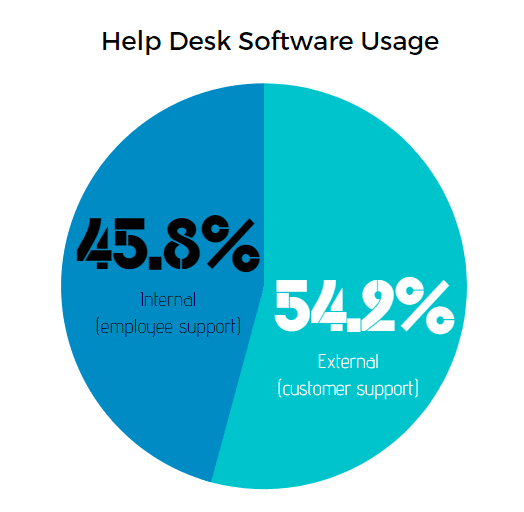
And even though the requirements overlap with customer-facing tools, supporting employees well calls for a different feature set. Here's what actually matters — and what most "top 10 lists" leave out.
1. Single sign-on (SSO)
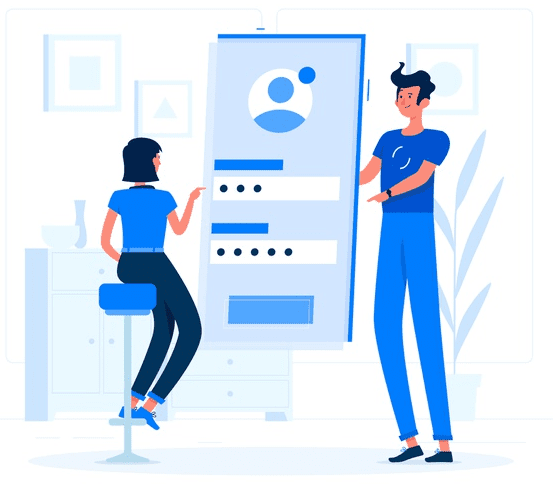
SSO is non-negotiable for employee support. Unlike customers, your staff already have corporate credentials. Forcing them to create yet another account is a guaranteed way to kill adoption.
Here's what to look for:
- SAML 2.0 — the de-facto standard for enterprise SSO. Works with every major identity provider: Azure AD (Entra ID), Okta, OneLogin, Ping Identity. If the vendor doesn't support SAML, walk away.
- Windows-integrated authentication (Kerberos/NTLM) — employees open the app in a browser and they're already signed in via their domain account. No login screen at all. This is usually only available in on-premise tools, but Jitbit Helpdesk supports it in both the on-premise and the cloud-hosted SaaS version.
- Azure AD / Entra ID — if your org runs on Microsoft 365, this is the simplest path. It uses SAML or OpenID Connect under the hood.
- Google Workspace login — for organizations running on G Suite / Google Workspace.
The bottom line: if employees need to remember a separate password for support, you've already lost. SSO reduces ticket volume on day one — because "I forgot my support password" is itself a top-five internal request.
2. SCIM — automated user provisioning
SSO gets people in. But who creates and removes those user accounts in the first place? That's where SCIM comes in.
SCIM (System for Cross-domain Identity Management) is a protocol that automatically syncs user accounts between your identity provider (Azure AD, Okta, etc.) and your support system. When a new employee joins the company in your HR system, their account is created automatically — with the right department, role, and permissions. When someone leaves, access is deactivated instantly.
Without SCIM, your IT team is manually creating accounts, assigning departments, and — worse — relying on someone to remove access for terminated employees. For a 200-person company with 15% annual turnover, that's 30+ manual account operations per year that someone has to remember to do. At 2,000 people, it's unmanageable.
What SCIM handles automatically:
- User creation — new hires get access on their first day, no IT ticket needed
- Attribute sync — department, job title, and manager fields stay up to date as people move within the org
- Deprovisioning — terminated employees lose access immediately, not "whenever someone remembers"
- Group mapping — AD groups or Okta groups map to support teams and permission levels
If your support tool doesn't handle SCIM, you're choosing to do manually what your identity provider already automates everywhere else. Jitbit Helpdesk supports SCIM provisioning with all major identity providers out of the box.
3. Automation rules
Automation usually means two things: trigger-based rules and scheduled tasks.
Trigger-based rules work on an "if this, then that" basis:
- "When a ticket arrives from the Finance department — assign to the finance IT liaison"
- "When a ticket contains 'VPN' in the subject — auto-reply with the VPN setup guide"
- "When a ticket hasn't been answered in 4 hours — escalate priority and notify the team lead"
Here at Jitbit, we noticed that when a customer sends a question, the first thing we ask is "is it the cloud version or on-premise?" — and if it's on-premise, we ask for the version number. That two-step ping-pong was a perfect candidate for an auto-response rule. Internal IT teams see the same patterns: "have you tried restarting?", "which office are you in?", "what's your employee ID?". Automate the first reply and you cut average resolution time significantly.
Scheduled tasks are equally important for internal IT. Every department has recurring maintenance: patching cycles, certificate renewals, backup verification, hardware audits, security scans. A good support system creates these tickets automatically on schedule and assigns them to the right person — so nothing falls through the cracks.
4. Integration with your existing stack
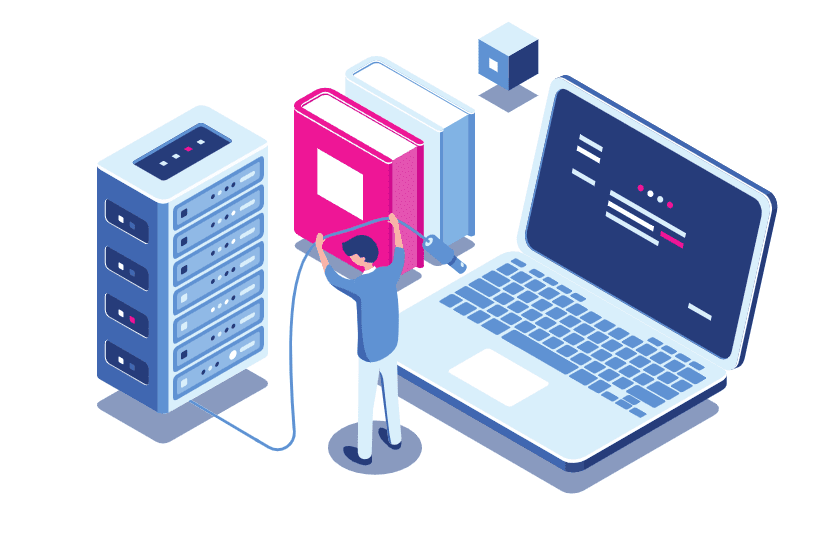
Your company already runs dozens of tools — email, Slack or Teams, project management, HR systems, monitoring. Employee support has to plug into all of them.
The integrations that matter most for internal IT:
- Email (IMAP/Exchange/Microsoft 365) — employees send an email, tickets are created automatically. Replies sync both ways.
- Slack / Microsoft Teams — employees submit tickets without leaving their messaging app. Agents get notifications in their channels.
- Monitoring tools (Nagios, Datadog, etc.) — server goes down, a ticket is created automatically before anyone even notices.
- HR systems — pull employee data, department info, and org chart relationships.
- Project management (Jira, Azure DevOps) — escalate tickets into dev tasks when the issue is actually a bug.
And when there's no built-in integration, you need a REST API. Not a "contact us for API access" situation — a real, documented API that your team can use to wire up custom integrations with in-house tools.
5. Knowledge base

A customer-facing support team needs a knowledge base. An employee-facing team needs one even more — because your coworkers aren't going anywhere. Every solved ticket that becomes a KB article is one less request next quarter.
What makes an internal knowledge base effective:
- Private vs. public articles — some articles are for all employees ("how to connect to VPN"), others are internal IT docs ("runbook for database failover"). You need visibility controls.
- Suggested articles on ticket creation — when an employee starts typing "VPN not working", the system should surface the KB article before they even submit. This is the single biggest deflection mechanism.
- Easy publishing from resolved tickets — if an agent writes a great reply, let them turn it into a KB article in one click. The knowledge is already there; don't make people write it twice.
Fair warning: a knowledge base only works if you make it part of the culture. It needs an owner — someone on the IT team who reviews, updates, and retires articles regularly. A stale KB is worse than no KB, because people stop trusting it.
6. Logging tickets on behalf of users
Here's something most software comparison articles ignore. Inside a company, a huge share of requests come in through offline channels:
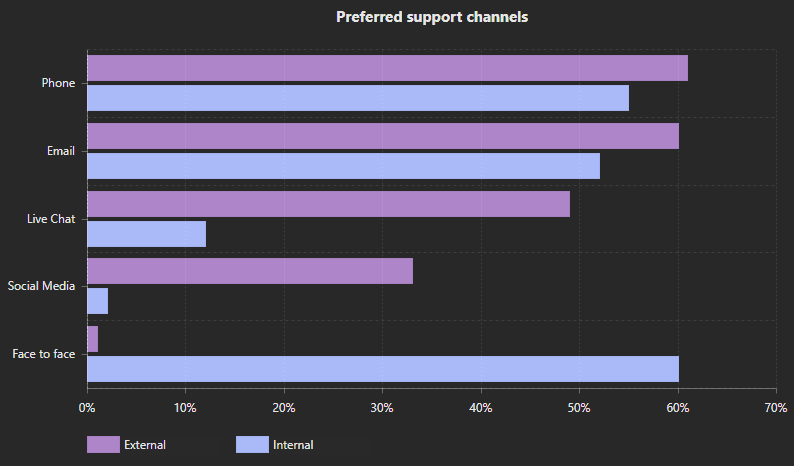
Phone calls and walk-ups dominate. Someone stops by the IT office and says "my monitor is flickering." That interaction needs to become a ticket — not because of bureaucracy, but for two real reasons:
- Metrics — you cannot measure your team's workload, response times, or recurring issues if half the requests are invisible.
- Follow-up — only a small percentage of issues are resolved on the spot. Most need parts ordered, research done, or a scheduled visit. Without a ticket, things get forgotten.
This means agents need a frictionless way to create tickets on behalf of another user — pick the employee from a directory, describe the issue, and link the request to the right person with full history. Bonus: it resolves the "I never asked for that" disputes when everything is logged.
7. Asset management
Internal IT support is fundamentally tied to hardware in a way that customer support rarely is. When someone reports "my laptop is slow," the first question is "which laptop?" — and you need the answer without a five-message back-and-forth.
Built-in asset management lets you:
- Link assets to employees — see all hardware assigned to a person in one view: laptop model, monitors, phone, peripherals
- Link assets to tickets — "this is the third ticket about this specific Dell Latitude in six months; it's time for a replacement"
- Track lifecycle — warranty dates, purchase dates, refresh schedules. Know what needs replacing before it breaks.
- Inventory auditing — when 200 employees are remote, you need to know where your hardware is
Without asset management in the same workflow, your IT team is maintaining a separate spreadsheet — which is always out of date — and cross-referencing it manually on every ticket.
8. Self-hosted (on-premise) option
Many organizations — especially in healthcare, finance, government, and defense — require that all software runs on their own infrastructure. Sometimes it's regulatory compliance (HIPAA, SOX, FedRAMP), other times it's internal security policy. Either way, if a vendor doesn't offer an on-premise deployment, entire industries are off the table.
Even outside regulated industries, self-hosting gives you full control over data residency, backup policies, and network isolation. Jitbit Helpdesk is available both as a cloud SaaS and as a self-hosted on-premise version — same product, same features, your choice of deployment.
Can one tool handle both internal and external support?
Yes. Many support platforms, including ours, handle both employees and external customers in a single system. The key is proper permission controls and ticket visibility rules — so employees don't see customer tickets and vice versa, and routing rules send each ticket to the right team automatically.
Frequently asked questions
What is an internal help desk system?
It's a ticketing platform used by a company's IT, HR, or facilities team to handle requests from employees rather than external customers. Think password resets, laptop issues, software access, new-hire onboarding, and office maintenance. The core mechanics overlap with customer support — tickets, categories, SLAs, automation — but the feature priorities differ: SSO, SCIM provisioning, asset tracking, and deep identity-provider integration matter far more.
What's the difference between an internal IT help desk and a customer help desk?
The workflows look similar, but the constraints aren't. Internal IT assumes the user population is known and authenticated — everyone is an employee, tied to an HR record, and typically signed in via SSO. That means you can safely pre-populate fields (department, manager, assigned laptop), enforce asset links, and integrate deeply with AD or Entra ID. Customer support deals with anonymous or self-registered users, so it leans harder on email capture, web forms, CSAT surveys, and public-facing channels. Most companies eventually run both — either in separate instances or in one tool with strict ticket-visibility rules.
What features matter most for employee IT support?
The eight covered above: single sign-on, SCIM user provisioning, automation rules, integrations with your existing stack (email, Teams/Slack, monitoring, HR), a knowledge base with visibility controls, the ability to log requests on behalf of walk-in users, asset management, and a self-hosted deployment option for regulated industries. If a vendor is missing any of these, you'll feel it within the first quarter — usually in the form of manual workarounds that turn into permanent habits.
Do small companies need a dedicated support tool?
Below about 25 employees, a shared inbox and a spreadsheet can work — barely. Once you're past that threshold, tickets start falling through the cracks, recurring issues become invisible because nobody tracks them, and new hires can't find the answers previous employees already got. The real trigger isn't headcount, though — it's when your IT or ops team starts saying "didn't someone already ask that last month?" more than once a week.
Images courtesy of Freepik