Helpdesk Ticket Priority Levels: P1–P5 Explained (With Examples)
 by Alex Yumashev ·
Updated Sep 16 2026
by Alex Yumashev ·
Updated Sep 16 2026
Helpdesk ticket priority levels tell your support team how fast a ticket must be handled and what escalation steps kick in. Start with an impact and urgency matrix, then use the P1-P5 examples below to define what each priority means for your team.
ITIL priority matrix: impact × urgency
An impact and urgency matrix gives agents a repeatable way to choose ticket priority. Impact measures the effect on the business: which services and people cannot work? Urgency measures how long a fix can wait before that effect becomes unacceptable. A broken printer with a working spare is different from a payment outage during checkout.
Here is an example you can adapt. The priority mappings and response times are your team's policy, not a universal ITIL requirement.
| Business impact | High urgency | Medium urgency | Low urgency |
|---|---|---|---|
| High | P1 — Critical | P2 — High | P3 — Medium |
| Medium | P2 — High | P3 — Medium | P4 — Low |
| Low | P3 — Medium | P4 — Low | P4 — Low |
- High impact: a critical business service is unavailable or a widespread issue stops work. Medium: a team or business function is disrupted. Low: a limited inconvenience with little effect on operations. User count helps, but one person blocked from running payroll can still have a large business impact.
- High urgency: work cannot wait and there is no usable workaround. Medium: a temporary workaround buys time, but the issue still needs attention soon. Low: work can continue and the fix can be scheduled.
Three examples of choosing a priority
- Checkout is down for all customers. High impact and high urgency: P1. Assign an incident owner and start the escalation process immediately.
- A team's shared printer is down, but a nearby printer works. Medium impact and low urgency: P4 in this example. Record the workaround and schedule the repair.
- One employee cannot use VPN and has no alternative connection. Low impact and high urgency: P3, assuming no critical business deadline is blocked. Reassess if other employees report the same fault.
Where does P5 fit? In the scheme below, P5 is for planned work and information requests with no immediate disruption. Keep it outside the active-incident matrix. Document any exceptions for security incidents or critical deadlines, and reassess a ticket when its impact changes.
Once you choose a priority, apply the response and resolution targets in your SLA policy. Priority determines the order of work; the SLA defines the clock. Configure reminders and escalation rules so an assigned ticket does not disappear into someone's queue.
P1-P5 priority levels and example resolution targets
The times below are illustrative targets. Agree on coverage hours, response times, resolution goals, and escalation owners before using them in a customer commitment.
Priority |
What it means |
Example |
Target resolution |
P1 - Critical |
Business-critical system down, no workaround |
Full outage, security breach, payment failure |
1-2 hours |
P2 - High |
Severe degradation, workaround exists |
Email delays, critical app errors, major slowness |
4-8 hours |
P3 - Medium |
Limited impact, single function affected |
Minor bugs, single-user issues, printer problems |
24-48 hours |
P4 - Low |
Inconvenience, standard service request |
Access requests, software installs, how-to questions |
3-5 business days |
P5 - Planning |
No immediate impact; planned change or info |
Feature requests, upgrades, documentation updates |
5+ business days |
Setting priorities correctly drives team urgency, powers automations, and gets customers their answer quickly. Without them, urgent issues queue behind trivial ones and an overwhelmed team gets pulled in every direction at once.
Depending on the size of your company, your product, and your support function, the scheme above may need tweaking. Companies often personalize it - if you're focused on revenue retention, for instance, customers that pay you more may deserve a higher priority tier than a literal impact reading would assign.
Below are five common approaches to designing the scheme. Pick the one that matches your strategy, or combine a few.
How critical the issue is
This is the most common way to assign a tier. How widespread is the issue that the customer is reaching out with? Is it affecting one person, a few people, or your whole userbase? For SaaS products, a good barometer here is: is it affecting the main user, all of the users on the account, or your customer's customers?
Many companies choose to loop in other systems when an issue is so widespread that it's qualified as a P1. If you're prioritizing tickets based on this:
- Automate reaching out to other companies that may be involved in the outage or issue (such as your server provider, for instance).
- Update your status page, if you have one.
- Loop in your engineering team or other teams within the company.
- Continue to update affected customers.
Much of this can be automated using integrations from your various platforms. And they should be-if you're having a widespread issue, you may have quite a few tickets to respond to in the inbox.
The more vast and technical the problem is, the higher the priority should be.
How long the ticket has been waiting for a response
When it comes to ticket response times, it's important to be quick. Why? Because 70% of consumers will work with the first company that responds to them. Similarly, outside of making sales, customers are generally more satisfied when they get a response within a “reasonable” amount of time.
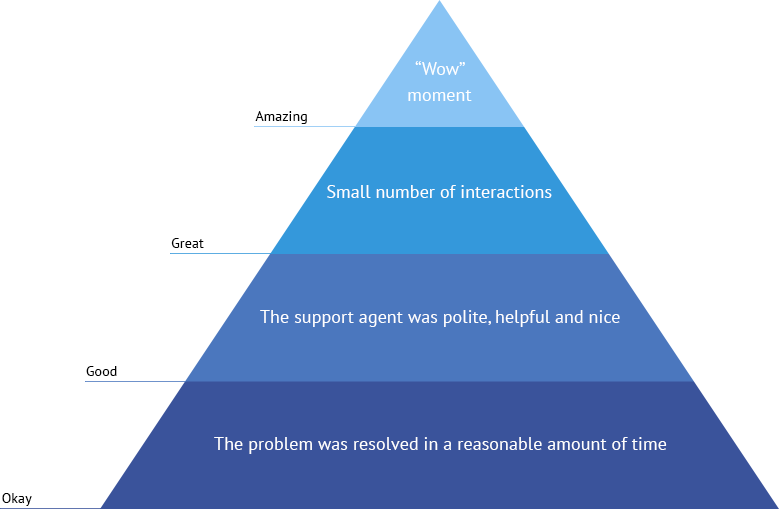
You can use the priority tier itself to ensure every customer gets a response in time. Use automation to set tickets on timers: the longer they've been waiting for a response, the higher up the priority list they go.
These timelines can align with your company goals, such as if you want to drop response times, or they can align with service level agreements (SLAs) that you've set for certain customers.
How much the customer is paying your company
If one of your company's top KPIs is revenue retention, you may want your scheme to ensure the customers paying you the most get help first. This also can be important if they've just started using your product and are already paying you.
Use one of your helpdesk's integrations to funnel in information about plan tiers and lifetime value into the context of each ticket. Then, use workflows to sort through priorities based on the different plan levels that you offer. In this instance, it may be that enterprise customers get ranked as Priority 1, business customers as Priority 2, and trial users as Priority 3.
If you don't have a subscription model, this could just be based on a customer's lifetime value or historical spending habits.
What service-level agreements (SLAs) you currently have in place
Do you have any SLAs in place for your customers right now? They are becoming increasingly important at the enterprise and business level, so it's probable that you've at least discussed it with some of your customers.
Some helpdesk solutions offer a built-in SLA functionality to keep track of where your team is hitting or missing the mark. SLAs usually look something like this:
Ticket priority |
Respond within |
Resolve within |
Actions when violated |
"Critical" |
1 hour |
3 hours |
Email the administrators |
"High" |
2 hours |
8 hours |
Email the administrators |
"Normal" |
4 hours |
24 hours |
Email the administrators |
"Low" |
7 hours |
48 hours |
none |
SLAs are useful because they serve as a tactic for upselling: many customers are willing to pay more for a service or product that comes with an SLA. You can find more SLA Templates here.
If you aren't ready to publicize your SLA, it can still guide internal helpdesk triage. It can also be a helpful motivational tool for your team. SLAs can help boost response and resolution times and can help measure long-term support team scalability and performance. Set your priority levels higher on tickets that are close to breaching SLAs in order to give them the quick attention they need.
How customers feel about the issue
One way that some companies handle this is by allowing customers to set their priority when they reach out. While you do not have to take this self-rating as gospel, it can be a helpful initial prioritization just to get a base.
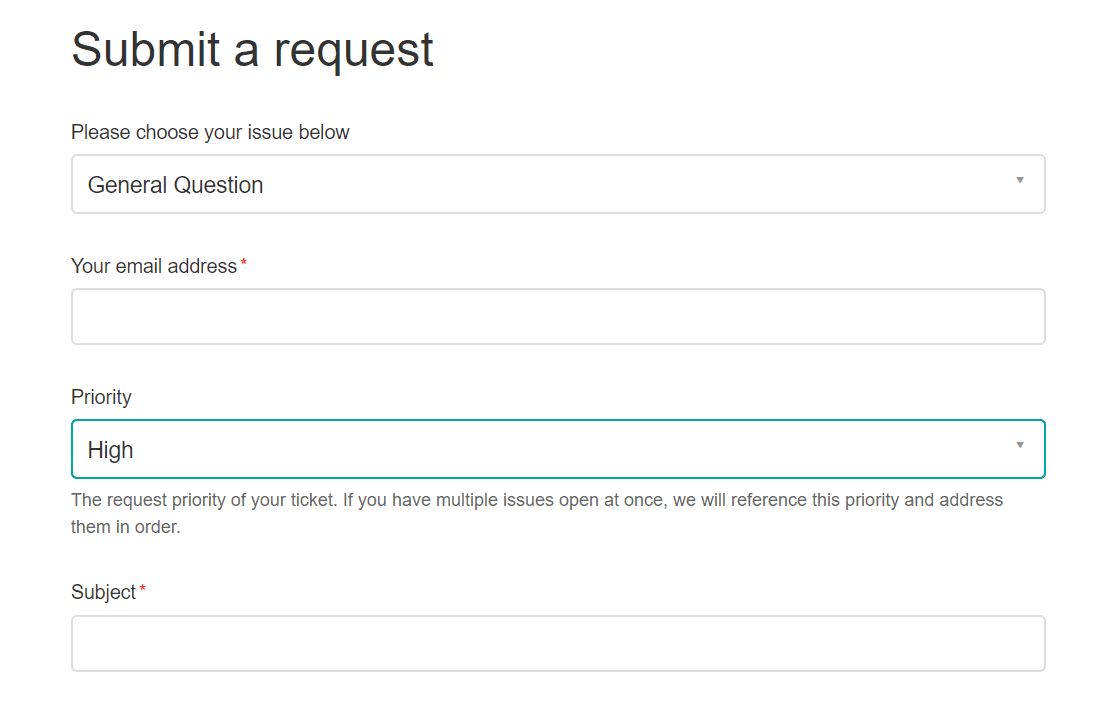
While you may not necessarily always prioritize tickets based on the user's opinion, you can use this information to gauge the frustration level of the customer. People that rank themselves with a higher priority are more likely to be frustrated than those that don't.
Prioritizing tickets based on how upset your customers are can be a great way to quickly assuage concerns and get responses to the tickets that are most likely to result in negative CSAT scores.
P1, P2, P3, P4, P5 definitions in this example
Use these definitions as a starting point for your own priority policy. The resolution times repeat the example targets above:
P1 (Priority 1) - Critical
- Large-scale impact affecting multiple users/departments
- Business-critical systems or services completely unavailable
- Significant financial impact or risk
- Resolution Time: Within 1-2 hours
Examples: Complete system outage, network down, security breach
P2 (Priority 2) - High
- Significant impact but with some workaround possible
- Service severely degraded but not completely unavailable
- Affects multiple users or a critical business function
- Resolution Time: Within 4-8 hours
Examples: Email delays, critical application errors, severe performance issues
P3 (Priority 3) - Medium
- Limited impact on business operations
- Non-critical service affected
- Workaround available
- Resolution Time: Within 24-48 hours
Examples: Minor application issues, single user problems, printer issues
P4 (Priority 4) - Low
- Minimal business impact
- Service inconvenience for individual users
- Standard service request
- Non-urgent issues
- Resolution Time: Within 3-5 business days
Examples: Access requests, software installation, how-to questions, minor cosmetic issues
P5 (Priority 5) - Planning
- No immediate impact on business operations
- Enhancement requests or planned changes
- Information requests
- Resolution Time: 5+ business days
Examples: Feature requests, system upgrades, documentation updates
Important Note
Priority levels are determined by considering:
- Impact (how many users/services are affected)
- Urgency (how quickly the business needs resolution)
- Business criticality of the affected service
- Time sensitivity of the work being impacted
Common questions about helpdesk priorities
What's the difference between priority and severity?
Severity describes how bad the technical problem is — a full outage is more severe than a broken button. Priority describes how urgently it needs to be handled, which factors in severity plus business impact, customer tier, and deadlines. A severity-1 bug in a rarely-used feature might be a P3. A severity-2 bug that blocks your largest customer at month-end might be a P1. Treat them as two separate fields and set priority from the combination.
Who should set the ticket priority - the customer or the agent?
Let customers suggest a priority, but don't make it final. Customer self-rating is useful as a frustration signal and a starting point, but agents should confirm or adjust based on actual impact and your defined criteria. Otherwise everyone marks their ticket "Critical" and the tier becomes meaningless.
How many priority levels should a helpdesk use?
Most teams use four or five. Three is too coarse to differentiate real outages from day-to-day issues. Six or more creates decision paralysis for the agent setting the tier. The ITIL P1-P5 scheme is the common default because P5 gives you a home for planned work and feature requests without clogging the active queue.
What's a realistic resolution time for a P1 ticket?
One to two hours for acknowledgement and active engagement, with the goal of full resolution or a workaround within the same window where possible. Anything slower and "P1" stops meaning "drop everything." If your team cannot staff that on a 24/7 basis, either narrow the P1 definition or publish the business-hours clock clearly in your SLA.
Is the ITIL P1-P5 scheme mandatory?
No. ITIL 4 defines priority as a function of impact and urgency but leaves the number of tiers to each organization. P1-P5 is a widely-adopted convention, not a rule. Pick the number of tiers you can actually staff distinct response times for.
What does "priority support" mean?
"Priority support" is a service tier some vendors offer to higher-paying customers or those with an SLA. It isn't a property of an individual ticket — it's a commercial arrangement where a customer's tickets start one tier higher by default, get routed to a faster queue, or come with tighter response clocks attached. Day-to-day, an agent still sets a P1–P5 label on each ticket; the "priority support" flag just changes the defaults.
What are priority status levels?
Priority status levels are the tiers a helpdesk uses to rank tickets by urgency — most commonly P1 through P5, or named equivalents like Critical / High / Medium / Low / Planning. Each level carries its own expected response time, resolution time, and escalation path, which is what lets your team work the queue in a defensible order and sets honest expectations for the customer waiting for an answer.
What are typical SLA times for P1, P2, P3, and P4 tickets?
There's no universal standard, but a common baseline looks like this: P1 — acknowledge within 15 minutes, resolve within 1–2 hours. P2 — acknowledge within 1 hour, resolve within 4–8 hours. P3 — acknowledge within 4 hours, resolve within 24–48 hours. P4 — acknowledge next business day, resolve within 3–5 business days. Adjust these to fit your staffing: an SLA you can't actually hit is worse than one that runs a little looser.
Help your customers get the best experience
Whichever scheme you pick, the goal is the same: a better experience for your customers and clearer direction for your team. Weigh your company's strategy, where your customers are in their lifecycle, and what your support team is trying to optimize for. Once those are clear, picking the right tiers and categories is straightforward.