AI Helpdesk - Smart Support Automation by Jitbit
Your support team answers the same questions dozens of times a day. Jitbit's AI helpdesk changes that. It reads your knowledge base, drafts accurate responses, triages incoming tickets, summarizes long threads, and polishes agent replies - all without your team lifting a finger. Choose from multiple AI providers including GPT, Gemini, and Claude. Here is how each feature works in practice and how to get started.
All videos on this page are recorded in real time (not sped up) in March 2026 with OpenAI as the provider.
Table of Contents
- Getting Started with the AI Helpdesk
- AI-Powered Automatic Ticket Responses
- AI Triage: Sentiment, Category, and Priority
- AI Auto-Responder for Live Chat
- Smart Knowledge Base Article Suggestions
- One-Click Ticket Summarization
- AI Reply Improvement for Agents
- Custom AI Prompts
- Custom AI Chat
- Generate Knowledge Base Articles from Tickets
- Built-in AI Tools
- External Tools: Connect Your Own APIs and MCPs
- Index External Documentation Sources
- Custom Instructions
- Supported AI Providers
- On-Premise Version Limitations
- Privacy and Data Protection
Getting Started with the AI Helpdesk
Jitbit's AI features are available on the SaaS helpdesk plan, which includes the infrastructure for vector embeddings and the RAG pipeline. On-premise customers can access AI features using their own API key from any supported provider.
To enable AI, head to Administration > AI features. You will need to opt in, since ticket data is sent to the AI provider you choose for generative features.
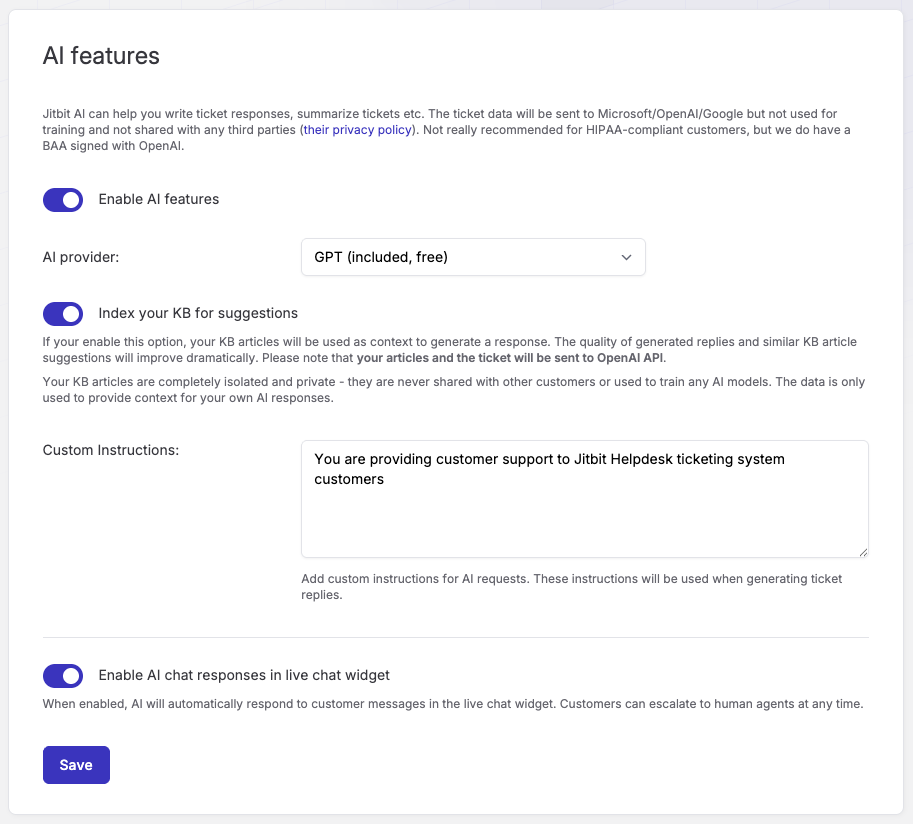
You will see these key settings:
- Enable AI features - Adds an AI button (✨) in the reply area so agents can access all AI features on any ticket. Available to both SaaS and on-premise customers.
- AI provider - Choose your preferred AI provider. SaaS customers get GPT and Google Gemini for free. You can also bring your own API key for Claude, Azure OpenAI, or AWS Bedrock.
- Index your KB for AI suggestions - This is where the real value is. Jitbit indexes your Knowledge Base using vector embeddings, so the AI draws on your own documentation to draft accurate, context-aware replies. Without this, the AI has no context about your company, products, or services.
Once enabled, an AI button (✨) appears in the ticket reply area.

AI-Powered Automatic Ticket Responses
When a customer submits a common question - "How do I reset my password?" for example - Jitbit's AI drafts an accurate response using your Knowledge Base articles. No manual typing required.
The AI uses your knowledge base, any external documentation you have indexed, and even your canned responses to find the most relevant answer.
You can take this further with automation rules: configure Jitbit to generate an AI response the moment a ticket arrives, effectively outsourcing your entire first-level support to AI. You can choose to post the reply directly to the customer, or mark it as an internal note for an agent to review first.
AI Triage: Sentiment, Category, and Priority
Not every ticket needs the same urgency. The AI Triage feature reads incoming tickets and automatically detects sentiment (positive, neutral, negative, or urgent), assigns the best-matching category, and sets the appropriate priority level - all in a single AI call.
Set it up as an automation rule that fires when a ticket is created, and every new ticket gets classified instantly. You can toggle category and priority assignment independently - sentiment detection is always on.
Use the detected sentiment to build automation chains. For example, route tickets flagged as "urgent" to senior support, or escalate negative-sentiment tickets to a manager. AI Triage runs in the background, so it never slows down your other automation rules.
AI Auto-Responder for Live Chat
If you use Jitbit's live chat widget on your website, you can enable the AI auto-responder. It handles incoming questions instantly using your knowledge base and detects when a visitor wants to speak with a real person - handing off the conversation seamlessly to your team.
Smart Knowledge Base Article Suggestions
When an agent opens a ticket about a login error or any other issue, the AI surfaces the most relevant Knowledge Base articles instantly. No more scrolling through a long list of articles to find the right one.
This feature runs on a local LLM and works even without enabling the AI provider - your data never leaves Jitbit's servers.
One-Click Ticket Summarization
Long ticket threads are hard to follow, especially when an agent picks up a conversation mid-stream. One click and Jitbit's AI condenses the entire thread into a concise summary - extracting only the key technical facts, actions taken, and error messages - so agents get up to speed in seconds instead of minutes.
AI Reply Improvement for Agents
Agents write replies under pressure. The AI reply improvement feature cleans up grammar, adjusts tone, and polishes phrasing before the response goes out. Think of it as a real-time editor that ensures every customer interaction sounds professional - without changing the meaning or adding new information.
Custom AI Prompts for Any Situation
Sometimes you need the AI to do something specific: politely decline a feature request, translate a reply, or rewrite a response for a different audience. Custom prompts let you guide the AI with your own instructions on a per-ticket basis, giving you full control over the output.
Custom AI Chat
Need to brainstorm solutions or ask follow-up questions about a ticket? The custom AI chat gives agents an open-ended, multi-turn conversation with the AI - right inside the ticket view. Ask "What are the main pain points for this customer?" or "Search if we have anything in KB for this," and the AI responds with full context from the ticket conversation.
The AI remembers the entire chat thread, so follow-up questions work naturally. Click "New Chat" to start fresh at any time.
Generate Knowledge Base Articles from Solved Tickets
All the AI features above work best when you have a solid Knowledge Base. But what if you are just starting out? Jitbit solves this chicken-and-egg problem: open any solved ticket and ask the AI to generate a KB article from the conversation. You can also use AI to improve existing KB articles - rewriting them for clarity or expanding on brief entries. Build your knowledge base over time with minimal effort.
Built-in AI Tools
Jitbit's AI is not just a text generator - it is an agent with built-in tools it can call autonomously when needed. You do not need to configure these; they work out of the box.
- Knowledge Base & Documentation Search - The AI automatically searches your KB articles and indexed external documentation when it needs information to answer a question.
Search past tickets for solutions - AI can trigger a search of similar closed tickets for solutions. This has worked surprisingly well for many of our customers.- Canned Response Search - The AI searches your library of canned/template responses when a query matches common scenarios you have templates for.
- Image Description - When a ticket includes screenshots or images (error messages, UI issues), the AI can analyze them and extract relevant text and details. (Beta)
You will see the AI's tool calls in the chat interface as collapsible sections, so you always know what data the AI used to form its response.
External Tools: Connect Your Own APIs and MCPs
Want the AI to look up a customer's order status, check their subscription, or query your CRM? External Tools let you register your own HTTP API endpoints that the AI calls automatically when relevant.
For example, create an endpoint that looks up order details by order number. When a customer writes "Where is my order #12345?", the AI extracts the order number, calls your API, and responds with the live shipping status - all without an agent touching the ticket.
Set up external tools in Administration > AI features > External Tools. Each tool needs a name, description (so the AI knows when to use it), your endpoint URL, and the parameters the AI should extract from the conversation. See our full documentation for the API contract and a step-by-step setup guide.
You can also connect your own MCP to the AI (or connect your agent to Jitbit's MCP).
Index External Documentation Sources
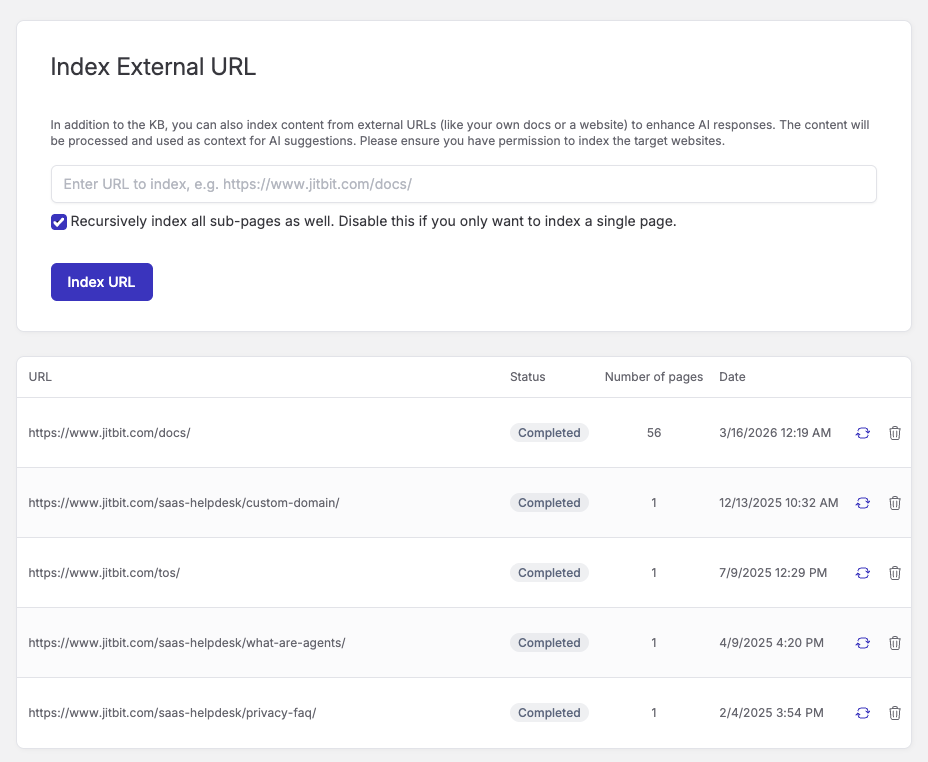
Better context means better AI responses. If your documentation lives outside Jitbit - on your website, in a wiki, or in external help pages - you can add those URLs in AI settings. Jitbit crawls and indexes the content (with optional recursive sub-page indexing) and uses it alongside your Knowledge Base for more accurate, comprehensive answers.
Custom Instructions
Shape how the AI behaves across all interactions with the Custom Instructions field in AI settings. Tell the AI about your company, your products, your tone, and your policies. For example:
- "You are providing customer support for Acme Inc., a SaaS accounting platform."
- "Our business hours are 9 AM - 5 PM EST."
- "Never promise refunds without manager approval."
- "Always mention our premium support option for complex issues."
These instructions are added to every AI interaction, so the AI stays consistent with your brand voice and policies.
Supported AI Providers
Jitbit supports multiple AI providers so you can choose the one that fits your requirements:
| Provider | Availability |
|---|---|
| OpenAI (GPT) | Included free on SaaS plans. On-premise customers provide their own API key. |
| Google Gemini | Included free on SaaS plans. On-premise customers provide their own API key. |
| Claude (Anthropic) | Bring your own API key. |
| Azure OpenAI | Bring your own Azure endpoint and API key. Ideal for enterprise data residency requirements. |
| AWS Bedrock | Bring your own AWS API key. (Beta) |
Switch providers at any time in Administration > AI features. All AI features work the same regardless of which provider you choose.
On-Premise AI Features
The on-premise helpdesk supports every AI feature on this page. Core generative features - ticket replies, summaries, triage, reply improvement, custom prompts, custom chat, KB article generation, and external tools - work out of the box using your own LLM API key.
Features that depend on vector embeddings - semantic KB search, similar-article suggestions inside tickets, and external documentation indexing - are available through the self-hosted AI add-on. It ships as a Docker Compose stack (Python service + Qdrant vector database) that you run next to your existing Helpdesk install. Setup is a single docker compose up -d.
Two differences from the SaaS plan remain:
- Bring your own API key for generative providers. SaaS includes GPT and Google Gemini at no extra cost. On-prem customers supply their own OpenAI, Azure OpenAI, AWS Bedrock, Claude, or Gemini key.
- Embeddings: local or OpenAI. The add-on ships with a free local embedding model that runs on CPU - no external calls at all. For higher accuracy you can switch to OpenAI embeddings with your own key.
Everything else - semantic search quality, the similar-article panel, external site crawling - is at parity with SaaS. See the on-prem AI add-on page for pricing and requirements, or the setup guide.
Privacy and Data Protection
AI features require sending ticket data and KB articles (including tech-only articles) to the selected AI provider for response generation. However, no AI-generated content reaches a customer unless an agent explicitly sends it. There is no risk of leaking private information without a deliberate action from your team.
The major AI providers (OpenAI, Google, Anthropic) state that API data is not used for model training and is not stored beyond what is needed to process the request. No information that could associate a KB article with your company name or other identifiable data is transmitted, unless that information is part of the article text itself.
For teams that need stricter data controls, Jitbit supports Azure OpenAI and AWS Bedrock, ensuring your data stays within your chosen cloud environment and never passes through third-party servers.
HIPAA Compliance
Jitbit has signed a BAA agreement with OpenAI, available upon request. If your organization requires HIPAA-compliant helpdesk software, our AI features can be covered under this agreement. For maximum control, use Azure OpenAI or AWS Bedrock with your own BAA.
Features
9 reasons to choose Hosted Zendesk vs. Jitbit Compare alternatives What is SaaS Active Directory Authentication Cloud Help Desk Free Email account and more Authentication API Online Ticketing System Benefits Single Sign On SLA and Help Desk Automation Helpdesk API Helpdesk for your industryResources
Customer reviews User guide FAQ What's new Version history Free trial Pricing