SLA Automation and Help Desk Workflow Rules

SLA automation turns your help desk from a reactive inbox into a self-managing system. Instead of agents manually routing tickets, watching deadlines and chasing follow-ups, Jitbit's automation rules engine handles it all — automatically.
Each automation rule follows a simple "if this, then do that" pattern. When a ticket meets a specific condition, Jitbit performs one or more actions instantly. For example: when a ticket arrives and its subject contains certain keywords, route it to the right category. Or if a ticket has not been updated for three hours, send a reminder to the assigned agent.
What Can SLA Automation Rules Do?
Support teams use Jitbit's automation engine to build a fully automated ticketing system that covers:
- SLA enforcement — automatically escalate tickets that approach or breach service level agreement deadlines
- Ticket routing and assignment — assign tickets to the right agent or category based on subject, priority or custom fields
- Escalation workflows — alert managers when tickets are overdue or stalled
- Staff and customer notifications — send targeted emails when ticket status changes or SLA thresholds are hit
- Help desk workflow management — move tickets through multi-stage workflows without manual intervention
- Auto-responding — reply to common questions automatically, ask customers to provide more details, or suggest a relevant Knowledge Base article before an agent even touches the ticket
Teams that implement SLA automation rules typically eliminate up to 40% of repetitive manual work, freeing agents to focus on the issues that actually need a human.
How to Create SLA Automation Rules
Setting up automation in Jitbit takes minutes, not days. Go to Admin → Automation Rules and click New Rule. The rule editor has three sections:
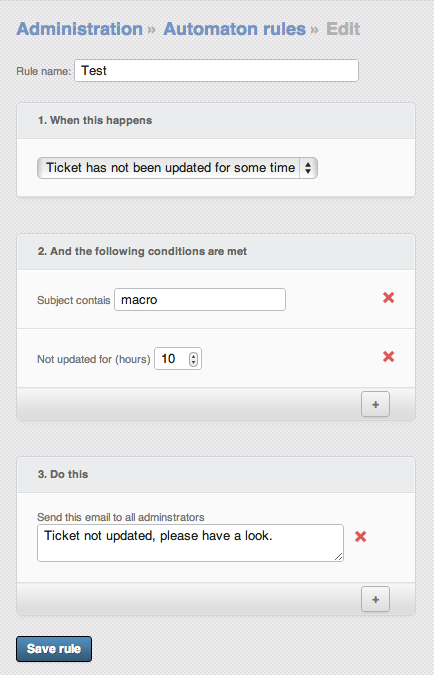
- When (trigger) — defines when the rule fires: when a ticket is created, when it is closed, when it becomes overdue, when a reply is added, and more.
- Conditions — optional filters that narrow the scope. For example: ticket priority is "High," ticket subject contains specific text, or a custom field has a particular value.
- Actions — what Jitbit should do when the trigger fires and conditions are met. Move the ticket to a category, change the priority, send an email, post to an external API — you can chain multiple actions in a single rule.
No coding required. The visual rule builder makes it easy for any admin to set up sophisticated SLA automation workflows in a few clicks.
SLA Automation Examples for Help Desk Teams
Here are real-world automation rules that Jitbit customers use every day:
- Knowledge base deflection — When a ticket is created and the subject contains keywords "A," "B" or "C," automatically send the customer a link to the relevant KB article.
- SLA breach alerts — When a ticket becomes overdue (past its SLA due date), send an alert to the team lead and the assigned agent.
- CSAT surveys — When a ticket is closed, automatically send the customer an email invitation to rate their support experience.
- Mandatory field prompts — When a ticket is created and a custom field (such as "Office") is empty, prompt the customer to fill it in.
- Smart assignment — When the "Office" custom field is set, assign the ticket to the technician responsible for that location.
- Stale ticket reminders — If a ticket has not been updated for several hours, send a reminder to the assigned agent or administrator.
- External system sync — When a new reply is added, send an HTTP POST request to an external API to update a CRM, project tracker or other business system.
See the complete list of automation triggers, conditions and actions for everything the engine supports.
Automated Chat Bots with Help Desk Rules
Jitbit's automation engine can also power basic rule-based chat bots using "nested" rules that trigger in sequence based on customer replies. This works with the live chat widget and with email tickets alike — your bot guides the customer through a series of questions before escalating to a human agent.
Check out our chat bot tutorial and video walkthrough for step-by-step setup instructions.
Beyond SLA Automation: Auto-Replies, Custom Fields and More
The automation engine is not limited to SLA enforcement. You can instruct Jitbit to automatically fill in custom fields based on customer replies, auto-respond to incoming emails, or build multi-step workflows that handle entire support processes end-to-end.
Combined with Jitbit's built-in ticket scheduler, you can also eliminate repetitive maintenance tasks — remind sysadmins to patch servers weekly, send HTTP pings to critical services, or update external issue trackers on a recurring schedule.
And if you want to take automation even further, pair these rules with Jitbit's AI features to auto-generate responses using your Knowledge Base — effectively outsourcing first-level support to AI.
Get Started with SLA Automation
Start a free Jitbit trial and build your first automation rule in minutes. No credit card required, no complex setup — just a faster, smarter help desk.
Features
9 reasons to choose Hosted Zendesk vs. Jitbit Compare alternatives What is SaaS Active Directory Authentication Cloud Help Desk Free Email account and more Authentication API Online Ticketing System Benefits Single Sign On SLA and Help Desk Automation Helpdesk API Helpdesk for your industryResources
Customer reviews User guide FAQ What's new Version history Free trial Pricing