Google Drive and Google Docs Integration for Helpdesk
Jitbit Helpdesk integrates with Google Drive and Google Docs, letting you attach files from your Google account directly to support tickets. No downloading, no re-uploading — just two clicks and the document is linked.
See the full list of Jitbit third-party integrations.
How to attach a Google Drive file to a ticket
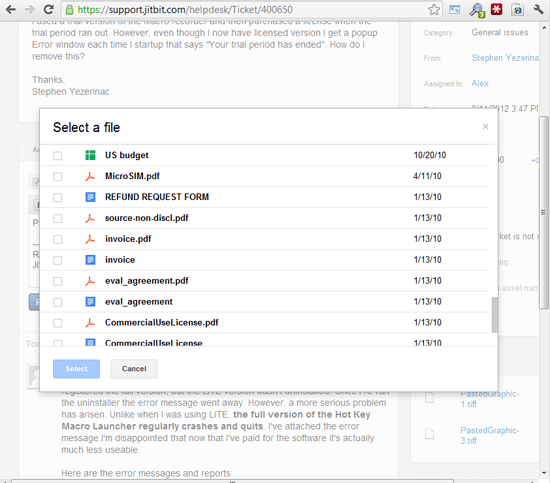
Open a ticket, click "Reply" and select "Attach Google Doc..." (the same option appears on the "new ticket" page). You will be prompted to sign in to your Google Account if you are not already signed in. Then choose a file, click "Select" and you are done.
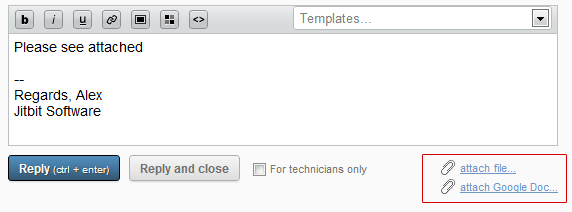
A link to the selected Google Drive file is added to the ticket's attachments section and automatically emailed to all ticket subscribers.
Security and permissions
When you attach a Google file to a support ticket, Jitbit stores only a link — the actual file is never copied to the helpdesk database. Permissions stay under your control on Google's end. You can revoke access or change sharing settings at any time without touching the helpdesk ticket itself.
This design keeps sensitive documents secure. Private files stay private, and you decide exactly who has access through Google's own sharing controls.
Collaborate on documents inside tickets
Linking Google Drive files instead of uploading static attachments is especially useful when your team needs to collaborate on a document. For example, your sales team can draft a contract in Google Docs while the support ticket tracks the customer conversation. The link in the ticket always points to the latest version, and Google keeps a full revision history.
Instead of attaching multiple versions of the same file to a ticket, you share a single Google Drive link. Everyone works on one copy, and every change is tracked automatically.
Why use Google Drive with your helpdesk
- No file size limits — share large files via Google Drive instead of clogging your helpdesk with heavy attachments
- Real-time collaboration — multiple agents or team members can edit the same document simultaneously
- Version control — Google handles revision history, so you always have the full edit trail
- Granular permissions — control exactly who can view or edit each file through Google's sharing settings
- Works with all Google file types — Docs, Sheets, Slides, PDFs and any other file stored in Google Drive
The Google Drive integration is available in both the hosted (SaaS) and on-premise versions of Jitbit Helpdesk. Try it free and see how it fits into your support workflow.