Helpdesk Kanban Board - Visual Ticket Management
Jitbit Helpdesk includes a built-in Kanban board that lets support teams manage tickets visually. Instead of scrolling through ticket lists, your agents drag and drop tickets between status columns - giving everyone an instant, real-time picture of the entire support queue.
You will find the Kanban view under Reports → Kanban. It displays all active tickets as cards on a board, organized by status. Move a ticket from "New" to "In Progress" or any custom status with a single drag.
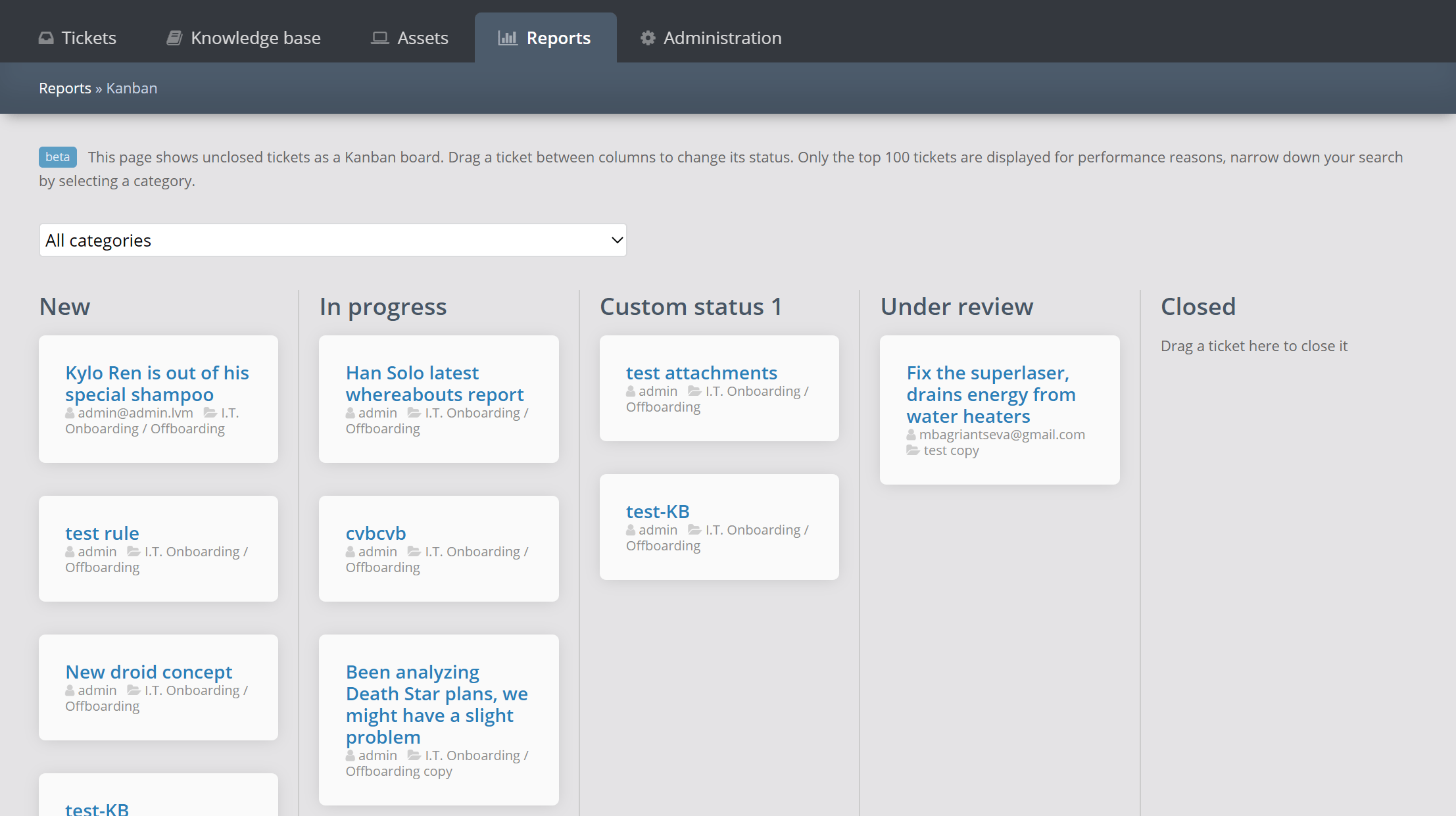
How the helpdesk Kanban view works
The Kanban board pulls in every active ticket and arranges them into columns, one column per ticket status. Each card shows the ticket subject, assignee, and priority, so agents can triage at a glance. The columns update in real time as tickets move through your workflow.
- Filter by category - narrow the board to a specific ticket category to focus on a single team or product area.
- Sorted by last update - tickets in each column are sorted by their "last updated" date, so the most recently active items float to the top.
- Drag and drop - move tickets between statuses instantly. No need to open a ticket and change the status manually.
- Custom statuses - the board respects your custom statuses, so columns like "Awaiting Customer", "Escalated", or "On Hold" appear automatically.
Why use a Kanban board for customer support
Traditional ticket lists are great for searching and filtering, but they hide the big picture. A Kanban board solves this by making your team's workload visible at all times:
- Spot bottlenecks instantly - if one column is overflowing, you know exactly where work is piling up and can reassign agents or adjust priorities.
- Reduce missed tickets - visual boards make it obvious when a ticket has been sitting untouched, so nothing slips through the cracks.
- Improve team coordination - everyone on the team sees the same board, which eliminates the "I thought you were handling that" problem.
- Track progress across custom workflows - whether you use three statuses or ten, the board adapts to your process.
Kanban board alongside other helpdesk reports
The Kanban view is part of Jitbit's full reporting suite, which also includes response speed charts, ticket-per-day trends, technician performance stats, and a custom report builder. While those reports measure what happened in the past, the Kanban board shows you what is happening right now - making it the ideal complement to historical analytics.
You can also use the real-time dashboard for a high-level metrics overview, then switch to the Kanban board when you need to act on individual tickets.
Getting started
The Kanban view is available in both the SaaS (hosted) and on-premise editions of Jitbit Helpdesk. No setup required - just navigate to Reports → Kanban and your board is ready. If you use custom ticket statuses, they will appear as additional columns automatically.
Explore Jitbit Helpdesk
Helpdesk features Hosted vs On-Premises Zendesk vs. Jitbit Compare alternatives Outlook Help Desk A Simple Support Ticket System System Requirements MS Teams and other integrations Help Desk Demo Email ticketing system GDPR Compliant Help Desk Software How does it work? HelpDesk Source Codes ASP.NET help desk Helpdesk API Case Studies Customer reviews User guide FAQ Version history Download now Pricing