Stripe Integration for Jitbit Helpdesk
The Jitbit Helpdesk Stripe integration lets your support team see customer payment data - subscriptions, charges, metadata and more - directly inside user profiles. No more switching between tabs or asking customers to confirm their account details.
See the full list of Jitbit third-party integrations.
Why connect Stripe to your helpdesk
When a customer submits a support ticket, your agents often need billing context: Is this person on a paid plan? When does their subscription renew? Have they had recent failed charges? Without a Stripe integration, agents waste time searching for this information manually.
With the Jitbit Stripe integration, all of that context appears automatically on every user profile. Your team can resolve billing-related tickets faster and give more informed answers to every customer.
How the Stripe integration works
Once you enable the Stripe integration, Jitbit pulls customer data from Stripe and displays it on the user profile page. Here is what it looks like:
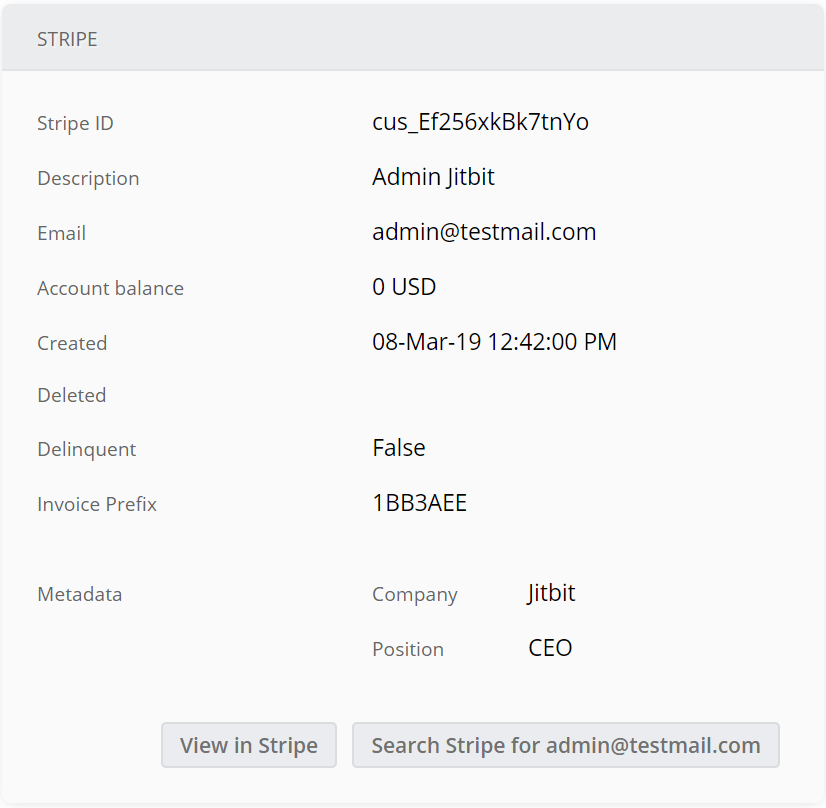
The integration displays the most important customer details at a glance:
- Subscription status - active, canceled, trialing or past due
- Payment history - recent charges and their amounts
- Customer metadata - custom fields you have defined in Stripe (equivalent to custom fields in Jitbit)
- Quick-access buttons - jump directly to the customer page in Stripe, or search by email, with a single click
Because the data is pulled in real time, your agents always see the latest billing information without leaving Jitbit.
How to set up the Stripe integration
Setting up the Stripe integration takes about one minute and requires no coding:
- In Jitbit, go to Administration → Integrations → Stripe.
- Click Enable the integration.
- Open the Stripe API keys page and copy your secret key (not the publishable key).
- Paste the key into Jitbit and click "Save".
That is it. Stripe customer data will now appear on user profiles across your helpdesk.
Here is a quick video walkthrough of the setup process:
Common use cases
Teams that handle billing-related support tickets benefit the most from this integration. Typical use cases include:
- SaaS companies - verify subscription tiers before answering feature questions
- E-commerce businesses - check order status and refund history while handling disputes
- Subscription services - identify churned or at-risk customers and route them to retention teams
If you need to pull data from other external sources, Jitbit also offers a flexible User Lookup feature that lets you connect any service with a JSON API.
Get started
The Stripe integration is available on all Jitbit Helpdesk plans - both SaaS hosted and on-premise. Start your free trial to try it today.