Customer Portal for Helpdesk Software
A customer portal is the single biggest lever for reducing support ticket volume while keeping customers happy. Instead of forcing every interaction through email, a well-designed customer portal lets users find answers on their own, submit tickets when they need to, and track progress in real time - all from one place.
Jitbit Helpdesk includes a fully featured customer portal out of the box. It works for both our SaaS helpdesk and self-hosted editions, and it takes minutes - not days - to set up. Here is what it offers your customers and your support team.
Built-in knowledge base for self-service
The first thing your customers see when they open the customer portal is the knowledge base. Populate it with FAQs, how-to guides, and product documentation, and a large share of visitors will find answers without ever creating a ticket.
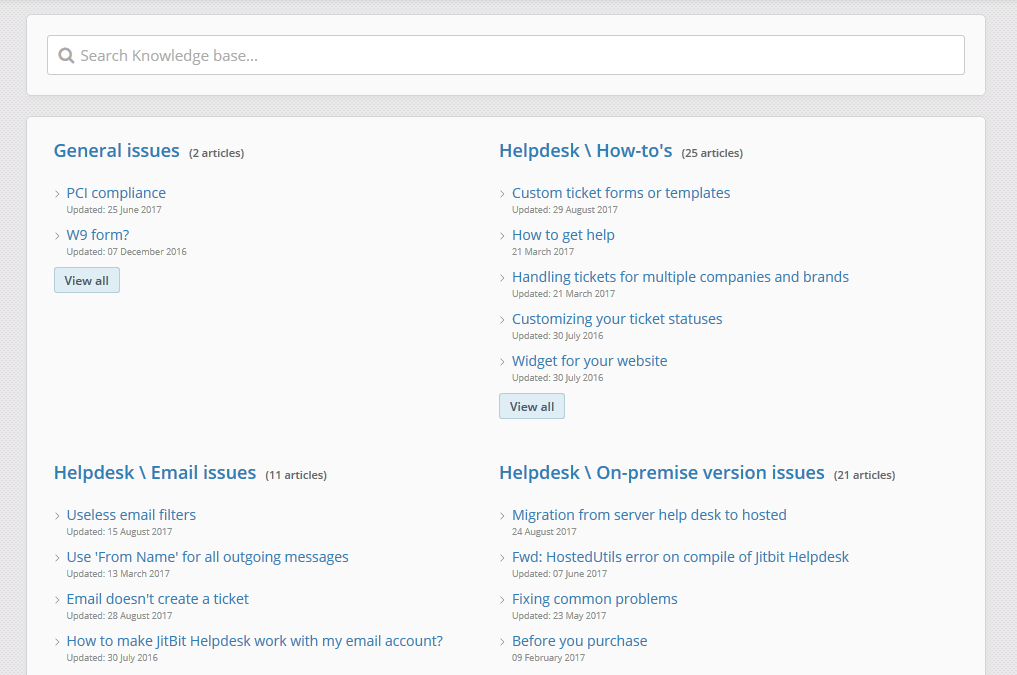
Jitbit's knowledge base supports:
- Categories and tags to organize articles by topic or product area
- Rich content including images, embedded videos, and file attachments
- Full-text search with filtering by tag, category, and date
- AI-powered article suggestions that surface relevant answers while a user types a new ticket subject
That last point is critical. When a customer starts creating a ticket, Jitbit automatically suggests matching knowledge base articles. This deflects repetitive questions and means your team handles fewer "how do I..." tickets every day.
Multiple ways to submit support tickets
When self-service is not enough, the customer portal makes it easy to submit a support ticket. Jitbit gives your users several options:
Direct ticket submission
Clicking the "New ticket" button opens a form with the ticket subject, description, category, and priority. The built-in WYSIWYG editor lets customers format their requests with rich text, and they can attach files by dragging and dropping or pulling them from Dropbox and Google Drive.
Embeddable support widgets
Jitbit provides two support widgets you can add to any page on your site:
- A lightweight popup widget that slides in from the corner of the page - minimal footprint, easy to customize
- A full-featured widget that mirrors the complete "new ticket" form including all custom fields
REST API for custom forms
If you need full control over the ticket submission experience, use the Jitbit Helpdesk API to build a custom form that matches your product's design exactly.
Real-time communication with the support team
After a ticket is submitted, the customer portal becomes a real-time communication channel. Customers see technician replies appear instantly - no page refresh required - turning the ticket page into a live chat experience when both sides are online.
Customers can also update ticket details (within the permissions you define), add follow-up replies, and attach additional files. Private notes and internal tech-to-tech communication stay hidden - your customers only see what you want them to see.
Full branding and visual customization
A customer portal should look like your product, not like a third-party tool. Jitbit makes branding straightforward at every level:
- No-code options: Change colors, upload your logo, set a custom page title, and swap the favicon - all from the admin panel
- Custom CSS and JavaScript: Fine-tune the layout, hide elements, or alter behavior for a fully tailored experience
- Custom domain: Replace company_name.jitbit.com with your own domain so the portal feels like a native part of your site
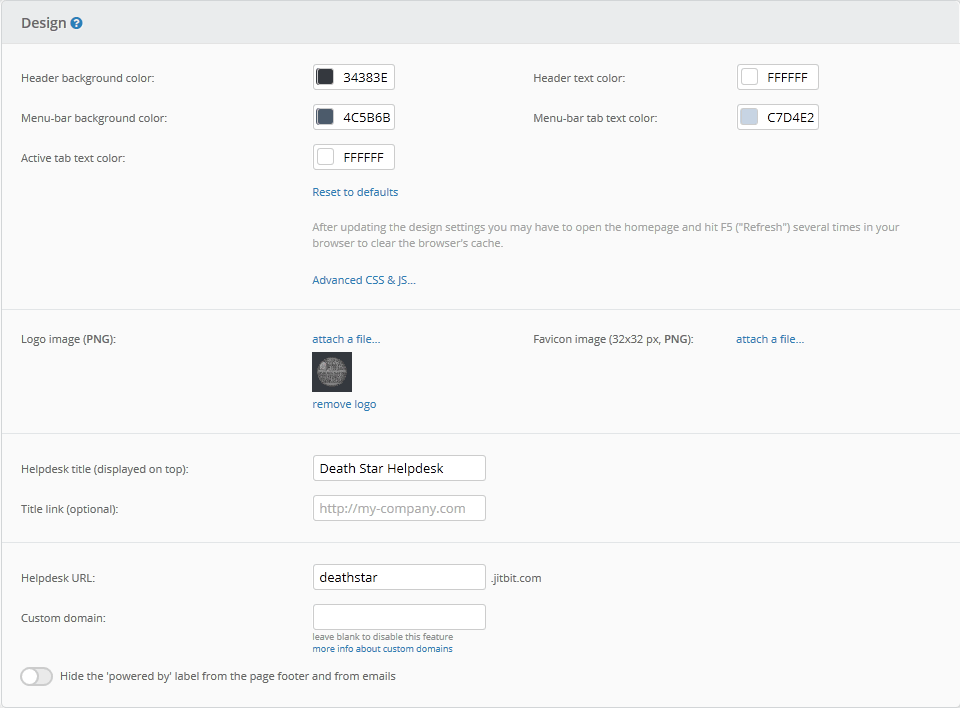
The goal is simple: your customers should never feel like they have left your product. Jitbit does not enforce its own branding on your portal.
Why your helpdesk needs a customer portal
Email-only support works for small teams, but it breaks down as volume grows. A dedicated customer portal delivers measurable advantages:
- Lower ticket volume. Knowledge base deflection means fewer repetitive questions reach your team.
- Faster resolution times. Customers provide structured information upfront through ticket forms with required fields, reducing back-and-forth.
- Better customer experience. Users can track open tickets, search past conversations, and find answers 24/7 without waiting for a reply.
- Reduced support costs. Every ticket deflected by self-service is time your team can spend on complex, high-value issues.
Try Jitbit's customer portal today
Jitbit Helpdesk gives you a branded, fully customizable customer portal with a built-in knowledge base, flexible ticket submission, real-time communication, and complete design control. It works out of the box with minimal setup.
Start your free trial and see the customer portal in action, or explore more helpdesk features.
Explore Jitbit Helpdesk
Helpdesk features Hosted vs On-Premises Zendesk vs. Jitbit Compare alternatives Outlook Help Desk A Simple Support Ticket System System Requirements MS Teams and other integrations Help Desk Demo Email ticketing system GDPR Compliant Help Desk Software How does it work? HelpDesk Source Codes ASP.NET help desk Helpdesk API Case Studies Customer reviews User guide FAQ Version history Download now Pricing