Helpdesk Software with Exchange Integration
Most organizations that run on Microsoft technologies rely on Exchange Server as the backbone of their email infrastructure. When you add a helpdesk to the mix, the last thing you want is a clunky workaround that forces you to enable insecure protocols or change the way your team handles email. Jitbit helpdesk software supports the native Exchange Web Services (EWS) protocol, so you can connect your support mailbox directly to your ticketing system - no IMAP, no POP3, and no compromises on security.
Why Use Exchange Protocol (EWS) for Your Helpdesk
Jitbit Helpdesk supports IMAP, POP3, and Exchange (EWS) for receiving emails. While all three work reliably, here is why many IT teams choose the native Exchange integration:
- Simple setup with zero server details. To connect your Exchange mailbox to Jitbit, you only enter a login and password. The system uses Autodiscover to find your server URL, port, and security settings automatically - no manual configuration needed.
- Compliance with strict security policies. Many organizations disable IMAP and POP3 on their Exchange servers because those protocols are considered less secure. EWS lets you integrate your helpdesk software with Exchange without opening additional ports or relaxing security rules.
- Better performance and lower overhead. EWS communicates more efficiently with Exchange than IMAP does. The difference is small for most workloads, but it adds up when your support team processes hundreds of tickets per day.
- Full compatibility with Exchange Online and Microsoft 365. Whether you run Exchange on-premises or use Exchange Online through Microsoft 365, Jitbit connects using the same EWS protocol. For Microsoft 365 mailboxes, you can also use the dedicated Office 365 integration with modern OAuth authentication.
When to Use IMAP Instead of EWS
If your email server is not Exchange-based - for example, Gmail, Fastmail, or another IMAP provider - then IMAP is your best option. IMAP is perfectly stable, secure, and fast. Jitbit Helpdesk treats IMAP as a first-class protocol and thousands of customers use it every day.
Avoid POP3 unless your email server does not support anything else. POP3 lacks features like server-side message management that IMAP and EWS handle natively.
How to Connect an Exchange Mailbox to Jitbit Helpdesk
Connecting your Exchange support mailbox to Jitbit takes under two minutes:
- Open the Jitbit admin panel and click Email.
- Click the Edit incoming mailboxes button near the top of the page.
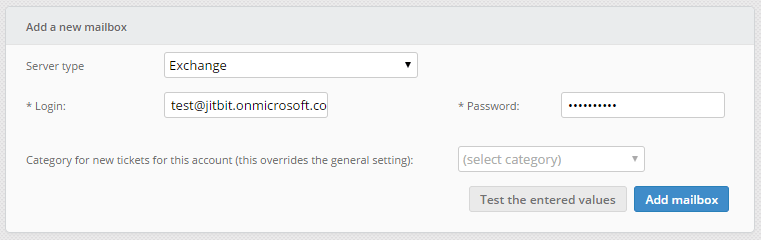
- In the "Add a new mailbox" panel, choose Exchange from the "Server type" dropdown.
- Enter your mailbox login and password, then click Add mailbox.
- Wait up to two minutes while Jitbit contacts your Exchange server via Autodiscover to detect its settings automatically. Do not close the page until the process finishes.
Once connected, every email that arrives in that mailbox is automatically converted into a helpdesk ticket. Your support agents can reply directly from Jitbit, and the response is sent back through your Exchange server - keeping your email branding and deliverability intact.
Troubleshooting Exchange Connectivity
If you see an error such as "URL was in an incorrect format" when adding your Exchange mailbox, check the following:
- Firewall and network access. Make sure your Exchange server is reachable from the internet (or from Jitbit's servers, for the SaaS version). Confirm that the EWS endpoint is not blocked by a firewall rule.
- Autodiscover must be enabled. Jitbit relies on the Exchange Autodiscover service to locate your server. If Autodiscover is disabled, the connection will fail. See Microsoft's documentation on how to configure the Autodiscover service.
- Test with Microsoft's own tool. Use the Microsoft Remote Connectivity Analyzer to verify that Autodiscover and EWS are working correctly on your server before contacting Jitbit support.
Jitbit supports Exchange Server 2007 and later, including all current versions of Exchange Online.
Exchange Integration Alongside Active Directory and SSO
For organizations that run a full Microsoft stack, Jitbit Helpdesk goes beyond just email. You can combine Exchange integration with Active Directory user sync to automatically import user profiles, departments, and avatars. Add SAML single sign-on through Azure AD, and your team gets a seamless login experience with no extra passwords to manage.
Explore the full list of Jitbit integrations to see how your helpdesk fits into your existing toolchain.
Get Started with Jitbit Helpdesk and Exchange
Jitbit Helpdesk is available as a cloud-hosted SaaS or an on-premise installation you deploy on your own servers. Both versions include full Exchange EWS support, IMAP, POP3, and dozens of other integrations out of the box. Start a free trial to connect your Exchange mailbox and see your first tickets arrive in minutes.
Explore Jitbit Helpdesk
Helpdesk features Hosted vs On-Premises Zendesk vs. Jitbit Compare alternatives Outlook Help Desk A Simple Support Ticket System System Requirements MS Teams and other integrations Help Desk Demo Email ticketing system GDPR Compliant Help Desk Software How does it work? HelpDesk Source Codes ASP.NET help desk Helpdesk API Case Studies Customer reviews User guide FAQ Version history Download now Pricing