Simple Ticketing System for Customer Support
 By Alex Yumashev
Jitbit is a simple ticketing system for customer support - the kind your team actually wants to use. It turns scattered emails, chats and phone calls into organized, trackable tickets, and shows you every open issue at a glance: which need immediate attention, which are awaiting a customer reply, which need input from a colleague, and which are ready to close. One clean dashboard. No bloat. No three-week onboarding.
Why teams pick a simpler tool: Jitbit installs in under 10 minutes, runs on-premise or in the cloud, and has roughly a third of the configuration screens of Zendesk or Freshdesk. Fewer knobs to turn means agents reply to tickets instead of fighting the software.
Why Your Team Needs This
Without a dedicated ticketing system, support requests get buried in shared inboxes, lost in forwarded email chains, or forgotten entirely. A support ticket system solves this by giving every request a unique ticket with a full history, clear ownership, and measurable progress.
With Jitbit, your team stops wasting time searching for context and starts resolving issues faster. Every interaction - email reply, internal note, file attachment - is captured in one place. And because Jitbit is built for speed and simplicity, your agents spend less time clicking through menus and more time helping customers.
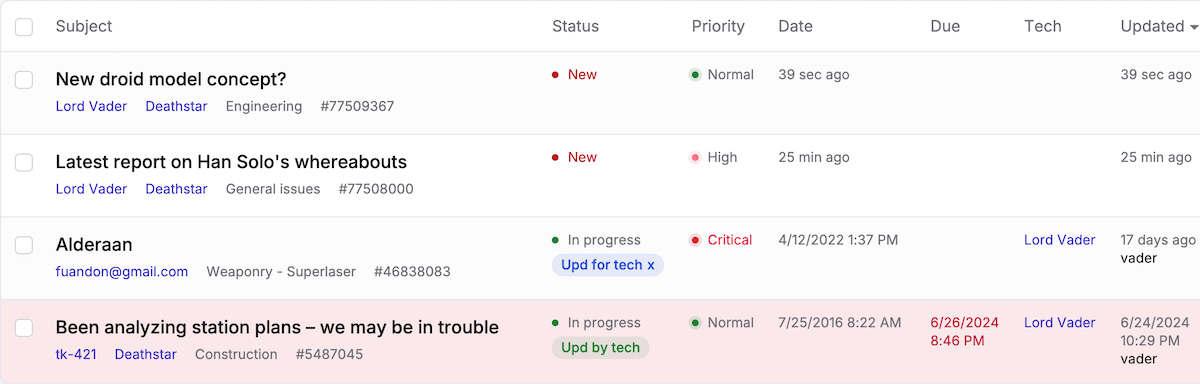
Automate Repetitive Ticket Tasks
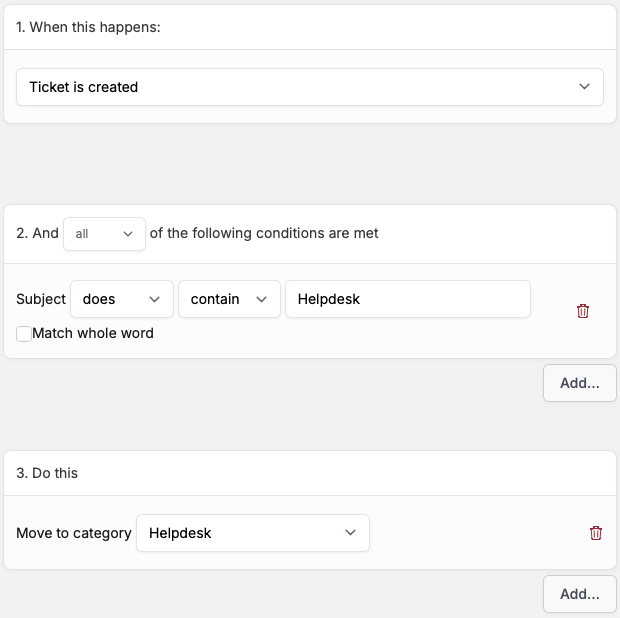 Manual ticket routing and follow-ups drain your team's time. Jitbit's helpdesk ticketing system includes a built-in automation engine that handles the repetitive work so your agents can focus on complex issues. The automation rules can:
- Send canned responses to common questions automatically.
- Route, prioritize, and assign incoming tickets based on the sender, subject line or category.
- Trigger follow-up emails after a set period of inactivity.
- Escalate overdue tickets and send SLA-breach alerts to managers.
- Set reminders and due dates for your support team.
These automations run in the background around the clock, reducing your average response time and making sure no ticket falls through the cracks.
Mobile Apps for Ticket Management On the Go
Support does not stop when your team leaves their desks. Jitbit's support ticket system includes free native apps for iOS and Android, so agents can triage, reply to and resolve tickets from anywhere - even on a slow connection.
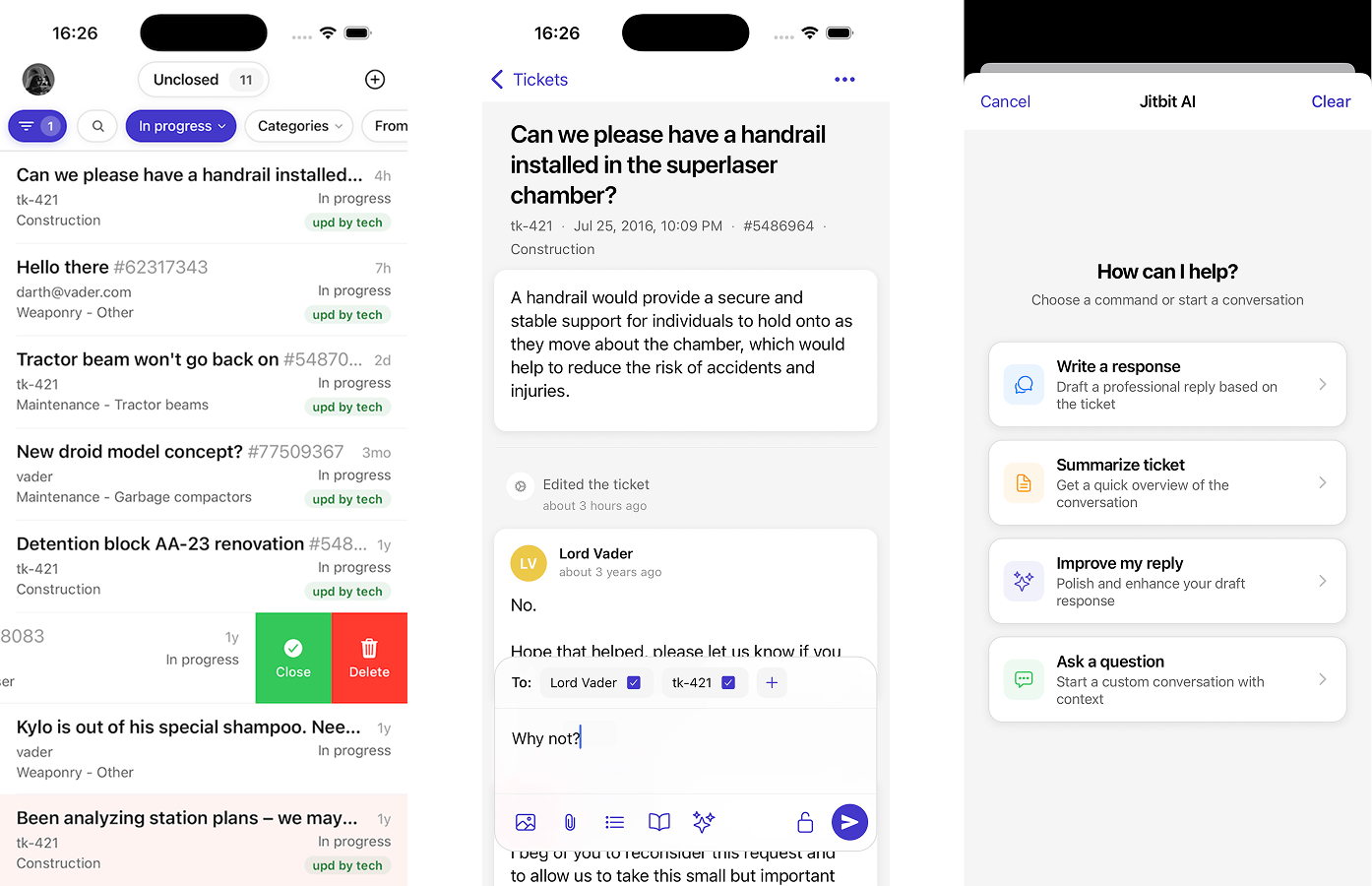
From the mobile app, agents can search tickets, assign them to colleagues, attach files, and get instant push notifications when new requests arrive. Or they can simply log into the responsive web app from any mobile browser.
Built-In Reporting to Measure Support Performance

You cannot improve what you do not measure. Jitbit's reporting suite gives managers clear insight into team performance: average first-response time, resolution time per agent, ticket volume trends, busiest hours, and customer satisfaction patterns.
Need something specific? Build custom reports with the drag-and-drop report builder and schedule them to land in your inbox every Monday morning. Use these insights to identify bottlenecks, reward top performers, and continuously improve your customer service operation.
Calendar View for IT Support Projects
Some tickets are not quick fixes - they are multi-day projects with deadlines. Jitbit's calendar view displays upcoming tickets and their due dates in a visual timeline. Administrators can track the team's workload at a glance and drag-and-drop tickets on the calendar to rebalance the schedule.
Assign Support Tickets to Multiple Agents
When a ticket requires input from several people - say a support agent, a system administrator, and a developer - Jitbit lets you assign a single ticket to multiple technicians. This is a unique feature that eliminates the need for duplicate tickets or side-channel conversations.
To maintain clear accountability, every ticket with multiple assignees still has one designated owner. Everyone involved can see the full conversation, but one person is responsible for driving the resolution.
Turn Incoming Emails into Support Tickets Automatically
Jitbit connects to your existing support mailbox via POP, IMAP or Exchange and converts every incoming email into a support ticket automatically. Replies to existing tickets are threaded into the original conversation, so nothing gets lost.
You can map different mailboxes to different ticket categories and brand your outgoing emails differently depending on the topic. The best part? To your customer, the entire exchange looks and feels like a normal email conversation. Learn more about our email ticketing system.
Self-Service Portal and Knowledge Base
Not every customer wants to send an email. Jitbit gives your users multiple ways to get help:
Web Portal: Customers log in to submit, track, and reply to their own tickets. Full transparency, zero phone tag.
Embeddable Widget: Add a lightweight JavaScript widget to your website that displays a "Help" button. Customers submit requests without leaving your site, and you can track which pages generate the most questions.
Knowledge Base: Jitbit includes a built-in knowledge base where customers can search for answers before submitting a ticket. When they do submit one, the system automatically suggests relevant articles - deflecting common questions and reducing ticket volume.
Your agents benefit from the knowledge base too. Both public and internal "technician-only" articles help them find accurate answers quickly and insert them directly into their replies.
A Simple Support Ticket System That Scales
Jitbit Helpdesk handles complex ticket workflows behind the scenes while keeping the day-to-day experience simple for agents and customers alike. It installs in minutes, requires no training, and scales from small teams to enterprise operations without becoming bloated or slow. If you need a support ticket system that your team will actually enjoy using, try the live demo or see pricing.
Further reading: help desk ticket system, support ticket software, helpdesk features.