Hipchat Integration with Jitbit Helpdesk
Hipchat Has Been Discontinued
Atlassian officially shut down Hipchat in February 2019. If you are looking for a team chat integration with Jitbit Helpdesk, we recommend using Slack or MS Teams instead. Both offer richer notification features and are fully supported.
Jitbit Helpdesk supported a Hipchat integration that sent real-time ticket notifications directly to your Hipchat rooms. Using automation rules, you could route notifications about new tickets, replies, and status changes to specific Hipchat channels based on custom criteria. The setup required a Hipchat room ID and an API token.
While this Hipchat integration is no longer active, the guide below is preserved for reference. The same "Send HTTP request" automation approach works with any modern chat platform that accepts webhooks.
See the full list of Jitbit third-party integrations.
Step 1: Getting the Hipchat API Token
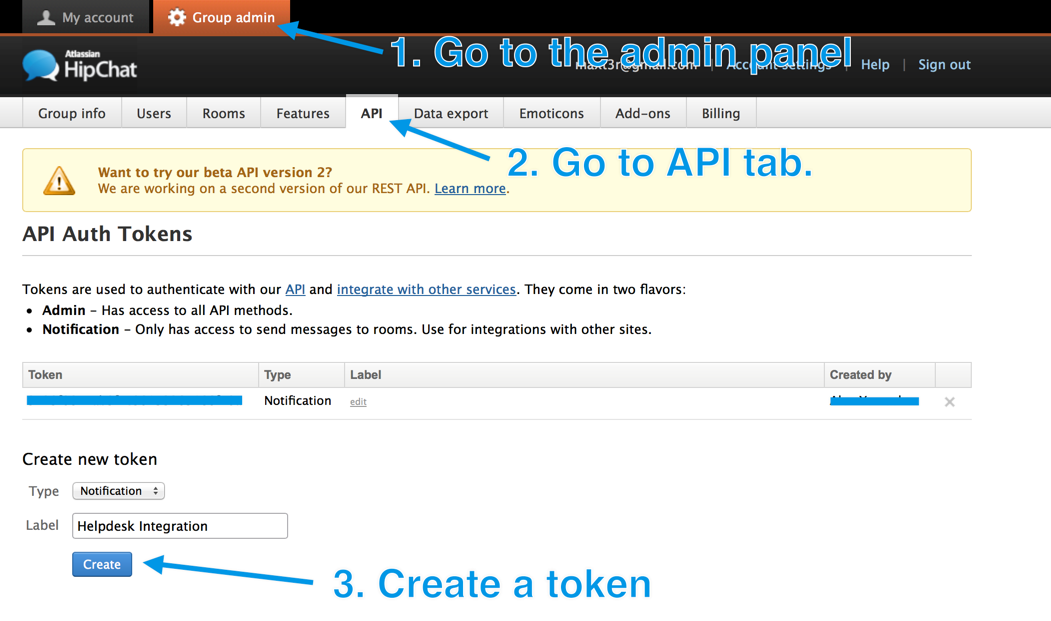
Log in to Hipchat and go to the Group Admin page. Click on the API tab and create a new token with the "Notification" type. Copy the generated token -- you will need it in step 3.
Step 2: Getting the Hipchat Room ID
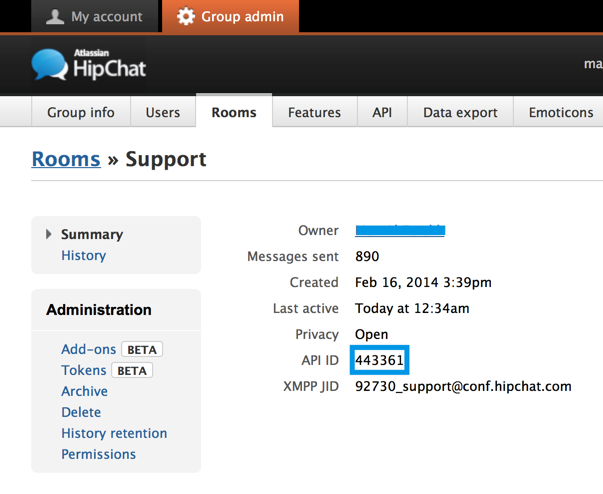
Click on the Rooms tab and select the room you want notifications sent to. The room ID appears on the next screen in the API ID field.
Step 3a: Quick Helpdesk Setup for Hipchat Integration
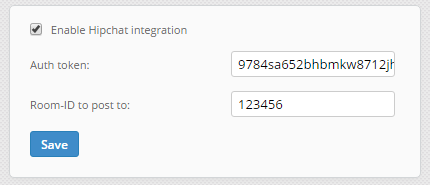
Log in to your Jitbit Helpdesk, go to "Administrator - Integrations - Hipchat" and enter your API token and room ID. Once saved, all new tickets are automatically posted to your Hipchat room.
Step 3b: Advanced Setup with Automation Rules
For more granular control over the Hipchat integration -- for example, routing notifications to different rooms depending on ticket category or priority -- use Jitbit's automation rules instead of the built-in integration. Go to Automation Rules in the admin panel and create a rule like this:
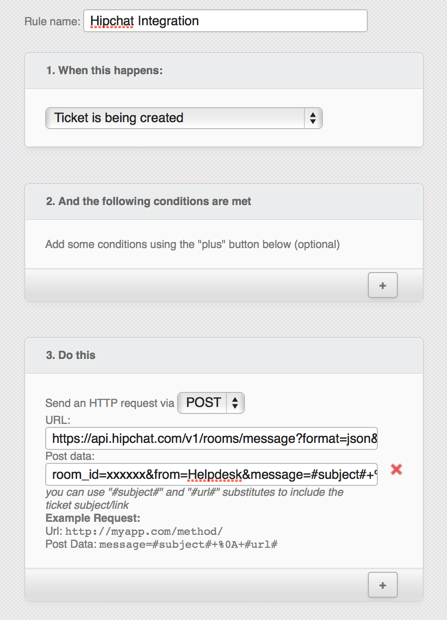
The key component is the "Send HTTP request" action. Configure it with the following parameters:
Type: POST
URL: https://api.hipchat.com/v1/rooms/message?format=json&auth_token=YOUR_API_TOKEN
Post data: room_id=YOUR_ROOM_ID&from=Helpdesk &message=New%20ticket%3A%20%22%3Ca%20href%3D%22#url#%22%3E#subject#%3C%2Fa%3E%22 &message_format=html
Replace YOUR_API_TOKEN and YOUR_ROOM_ID with the values from steps 1 and 2. This rule sends a notification to your Hipchat room for every new ticket. Notifications looked like this:
Recommended Alternatives to Hipchat Integration
Since Hipchat is no longer available, Jitbit Helpdesk offers fully supported integrations with modern team communication platforms:
- Slack integration -- Get instant ticket notifications in your Slack channels. One-click setup with no API tokens required.
- MS Teams integration -- Receive helpdesk notifications directly in Microsoft Teams channels via webhooks.
- Zapier integration -- Connect Jitbit Helpdesk with 5,000+ apps including Google Chat, Discord, and other messaging platforms.
All of these integrations support the same core functionality -- real-time ticket notifications sent to your team's chat -- and provide a more reliable, actively maintained connection than the legacy Hipchat integration.