Helpdesk Basecamp Integration - Connect Support Tickets to Projects
Jitbit Helpdesk integrates with Basecamp, the popular project management platform. The helpdesk Basecamp integration lets your support agents turn any ticket into a Basecamp to-do item with a single click - keeping your support and project teams in sync without copy-pasting or switching between apps.
See the full list of Jitbit third-party integrations.
Why connect your helpdesk with Basecamp
Support tickets often surface bugs, feature requests, and tasks that need action from your project team. Without an integration, agents waste time manually creating to-do items and relaying context between tools. The Jitbit-Basecamp integration eliminates that overhead:
- One-click ticket-to-task conversion - send a support ticket to any Basecamp project as a to-do entry, complete with ticket details.
- Keep context intact - the to-do item links back to the original helpdesk ticket, so your project team always has the full customer conversation.
- No workflow disruption - agents stay inside the helpdesk ticketing system they already know. No new tools to learn.
Setting up the Basecamp integration
Connecting Jitbit Helpdesk to Basecamp takes under two minutes. Follow these steps:
1. Go to "Admin - Integrations"
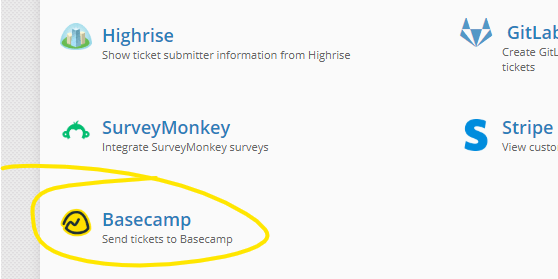
2. Select "Basecamp"
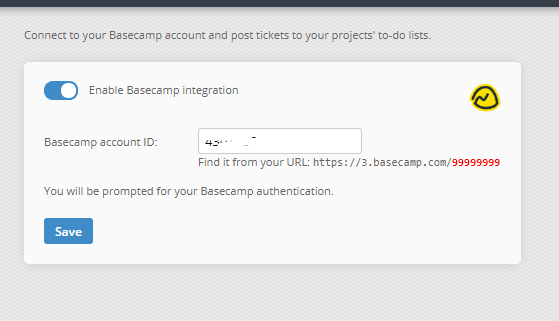
3. Enable the integration and enter your Basecamp account ID. You can find the account ID in your Basecamp URL - it is the number at the end of the address (for example, https://3.basecamp.com/1234567).
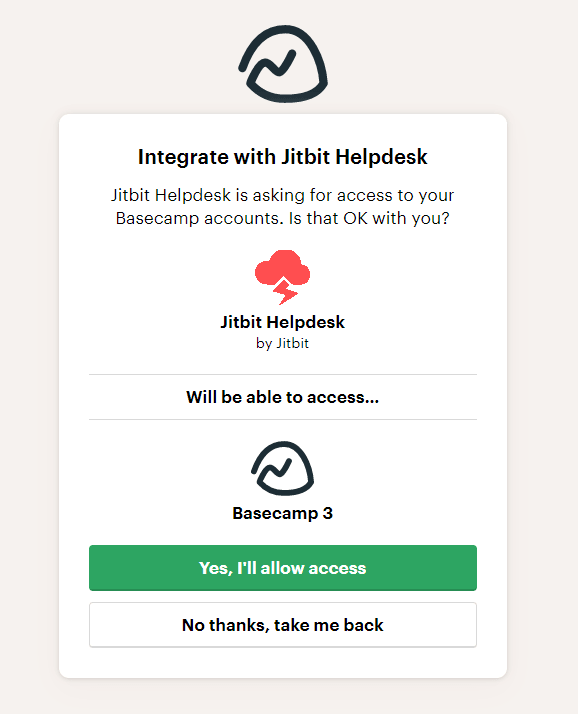
4. Authorize the connection. You will be redirected to the Basecamp authentication page. Click "Allow" to grant Jitbit access.
That is it. The integration is now active and every support ticket in Jitbit will have a "Send to Basecamp" option, allowing agents to choose the target project and create a to-do item instantly.
How the integration works in practice
Once enabled, a "Send to Basecamp" button appears in each ticket's sidebar. When an agent clicks it, they select the Basecamp project and the ticket is pushed as a to-do item. The to-do includes the ticket subject, description, and a direct link back to the ticket in Jitbit - so whoever picks up the task on the Basecamp side has full context without asking the support team for details.
This is especially useful for development and operations teams that manage their work in Basecamp but rely on the helpdesk for customer-facing communication. Instead of losing track of reported issues, every actionable ticket flows directly into the right project.
Other helpdesk integrations
Basecamp is just one of many project management tools Jitbit connects with. If your team uses a different platform, check out the Jira integration, GitLab integration, or GitHub and Bitbucket integration. Jitbit also integrates with Slack, Microsoft Teams, and hundreds of other apps via Zapier.
Ready to streamline your support workflow? Try Jitbit Helpdesk and connect it with Basecamp and the rest of your toolchain.
Explore Jitbit Helpdesk
Helpdesk features Hosted vs On-Premises Zendesk vs. Jitbit Compare alternatives Outlook Help Desk A Simple Support Ticket System System Requirements MS Teams and other integrations Help Desk Demo Email ticketing system GDPR Compliant Help Desk Software How does it work? ASP.NET help desk Helpdesk API Case Studies Customer reviews User guide FAQ Version history Download now Pricing