Helpdesk ChatGPT Integration - AI-Powered Ticket Replies and Summaries
The Jitbit Helpdesk ChatGPT integration lets your support agents draft accurate ticket replies, summarize long conversations, and polish responses - all with a single click. Instead of typing every reply from scratch, your team can use AI to handle the repetitive parts of customer support while staying in full control of what gets sent.
What the Helpdesk ChatGPT Integration Does
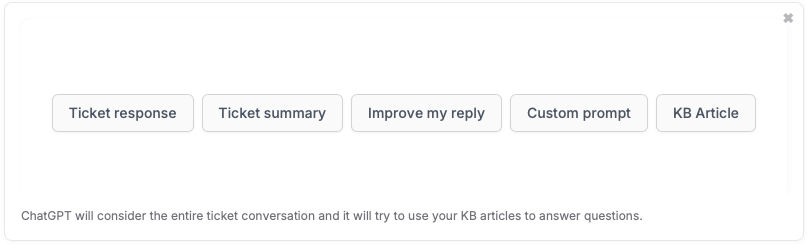
Once enabled, the ChatGPT integration adds a "GPT" button directly inside the ticket reply editor. Clicking it gives agents four AI-powered actions:
- Write a new reply - ChatGPT drafts a response based on the ticket conversation and, on the SaaS version, your Knowledge Base content
- Summarize the conversation - condenses the entire ticket thread into a brief summary, so agents picking up a ticket mid-stream can get up to speed in seconds
- Improve your own reply - cleans up grammar, adjusts tone, and polishes phrasing before you hit send
- Custom prompt - send your own instructions to ChatGPT on a per-ticket basis (translate a reply, rewrite for a different audience, politely decline a request, etc.)
Knowledge Base-Aware AI Replies (SaaS)
On the SaaS version of Jitbit Helpdesk, the ChatGPT integration goes further: it considers your Knowledge Base content when drafting replies. This means the AI draws on your own documentation to produce accurate, context-aware answers instead of generic responses. You can also index external documentation sources - your website, wiki, or help pages - to give the AI even more context.
On the self-hosted version, ChatGPT works only with the current ticket and its replies. It does not have access to your Knowledge Base or other tickets.
How to Enable the ChatGPT Integration
For SaaS Users
- Log in to your Jitbit Helpdesk account with administrator privileges.
- Navigate to Administration > AI.
- Enable ChatGPT integration by checking the box.
- Optionally, enable Use your KB for AI suggestions to make replies Knowledge Base-aware.
No API key is required - the SaaS infrastructure handles everything. You can start using ChatGPT features immediately after enabling.
For On-Premise Users
- Log in with administrator privileges and go to Admin > Integrations.
- Find the ChatGPT section and enable it.
- Obtain your OpenAI API key from the OpenAI platform if you don't have one.
- Enter the API key in the designated field and save.
How Support Teams Use the ChatGPT Integration
Here are common ways teams put the helpdesk ChatGPT integration to work:
- First-response drafting - agents click "Write a new reply" to get an AI-generated starting point, then review and personalize before sending. This cuts first-response time significantly.
- Ticket handoff - when a ticket gets reassigned, the new agent clicks "Summarize" to understand the full context without reading through dozens of replies.
- Quality control - junior agents draft a reply and use "Improve your reply" to polish grammar, tone, and clarity before it reaches the customer.
- Automated first-level support - combine the ChatGPT integration with Jitbit's automation rules to automatically generate an AI response the moment a ticket arrives, effectively handling routine questions without agent involvement.
- Multilingual support - use custom prompts to translate replies for customers who write in a different language.
Privacy and Data Protection
AI features send ticket data to the OpenAI API to generate responses. However, no AI-generated content reaches a customer unless an agent explicitly sends it. There is no risk of leaking private information without a deliberate action from your team.
For teams with stricter data requirements, Jitbit also supports private AI instances via Azure OpenAI and AWS Bedrock (Claude). Read more about AI privacy safeguards.
Beyond ChatGPT: Full AI Helpdesk Capabilities
The ChatGPT integration is just one part of Jitbit's AI helpdesk suite. Additional AI features include:
- AI auto-responder for live chat - handles incoming website chat questions instantly and hands off to a human when needed
- Smart KB article suggestions - a local LLM surfaces relevant Knowledge Base articles for agents without sending data to external APIs
- KB article generation - turn solved tickets into Knowledge Base articles with one click, building your documentation over time
Jitbit Helpdesk also integrates with Slack, JIRA, Zapier, and dozens of other apps to fit into your existing workflow.