Service Desk Software - ITIL-Compatible IT Service Desk
What Is Service Desk Software?
Service desk software is the central hub your IT team uses to receive, track, and resolve every user request and incident. Under the ITIL framework, the service desk acts as the single point of contact between your IT department and everyone who depends on it - employees, customers, and stakeholders alike.
Jitbit Helpdesk is a fully ITIL-compatible service desk solution that covers every stage of the incident lifecycle - from logging and categorization through diagnosis, resolution, and escalation. Whether you choose cloud-hosted SaaS or the self-hosted on-premise version, you get the same powerful IT service desk toolset.
Core ITIL Service Desk Activities Jitbit Covers
The ITIL specification defines a clear set of daily service desk activities. Here is how Jitbit's service desk software handles each one:
- Incident logging - capture tickets via email, web portal, API, or mobile app
- Identification and categorization - sort incidents into categories with custom fields and tags
- Prioritization - assign low, normal, high, or critical priority with color-coded views
- Initial diagnosis - leverage the built-in knowledge base for faster troubleshooting
- Communication with users - reply from the helpdesk while the user sees normal email
- Incident resolution and closure - close tickets with one click or use "reply and close"
- Escalation to higher levels - reassign agents or move tickets to a second-level category
Let's look at each of these service desk capabilities in more detail.
Incident Logging: Multiple Channels, One Service Desk
Jitbit's service desk software gives your users several ways to log an incident or request - so nothing falls through the cracks.
- Email-to-ticket conversion. Connect your support mailbox directly to Jitbit. Every incoming message becomes a new ticket or gets appended to an existing conversation. Setup takes minutes and only needs to be done once - Jitbit monitors your mailbox continuously and imports new messages automatically.
- Web portal. Users can submit requests through a customizable "new ticket" form with rich formatting and file attachments, then track progress through the same portal.
- REST API and widgets. Use the Jitbit API to log incidents from external sources, or install a lightweight support widget on your website or intranet.
- Mobile apps. Free iOS and Android apps let users and agents log and manage incidents on the go.
Categorization and Prioritization with Service Desk Automation
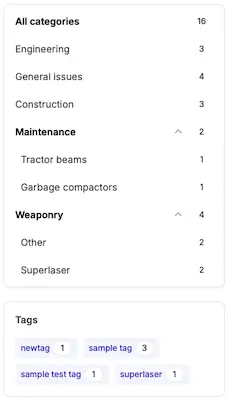
Categories are a core feature of Jitbit's service desk software. They give you a flexible, powerful way to organize ITIL incidents:
- Create separate categories for each type of request your team handles.
- Assign different agent groups to their respective categories so tickets reach the right people instantly.
- Add category-specific custom fields for additional context - like "affected server" for infrastructure requests or "device model" for hardware issues.
- Define custom statuses per category when different request types have different resolution workflows.
Every ticket can also be assigned one of four priority levels - low, normal, high, or critical. Your incident list is color-coded by priority, and you can filter to show only critical requests when things get busy.
To reduce manual work, Jitbit's Automation Rules engine can categorize and prioritize tickets automatically. A simple example: "If the incident subject contains 'printer,' move it to the 'Printers' category and set priority to Normal." Teams that use Automation Rules typically cut manual triage time significantly, freeing agents to focus on resolution rather than sorting.
Initial Diagnosis: Knowledge Base and AI Suggestions
Fast diagnosis is where a good IT service desk separates itself from a basic ticketing tool. Jitbit's built-in knowledge base lets you store articles, how-to guides, troubleshooting steps, and internal documentation in a searchable repository.
- Mark articles as public (visible to end users for self-service) or private (for IT staff only).
- Jitbit automatically suggests relevant knowledge base articles to agents when they view an incident - and to end users when they create new tickets.
- Paste a KB article directly into your reply with a couple of clicks, cutting response time dramatically.
Combined with AI-powered suggestions, your team resolves common issues faster while building a growing library of solutions.
Seamless Communication Between IT and Users
Throughout the life of an incident, service desk agents communicate with users directly from Jitbit. Every reply written inside the helpdesk is delivered to the user as a standard email notification. From the end user's perspective, the entire conversation looks and feels like normal email - no learning curve, no third-party app to install.
Users who prefer a richer experience can use the web portal instead. The incident activity feed displays all previous communication arranged chronologically, making it easy to pick up where the conversation left off.
Incident Resolution and Closure
When an incident is resolved, closing it takes a single click. You can also:
- Enable automatic closure notifications so end users know their ticket has been resolved.
- Use the "reply and close" button to provide the resolution details and close the ticket in one step.
- Track resolution metrics through Jitbit's built-in reports to identify bottlenecks and improve your team's performance over time.
Escalation to Higher Support Levels
When a first-level technician cannot resolve an incident, Jitbit offers two escalation paths:
- Reassign the ticket. Change the incident assignee to a second-level agent. The new assignee receives an email notification immediately. You can also add a secondary assignee - Jitbit is one of the few service desk tools that supports multiple agents on a single ticket.
- Move to a higher-level category. Create dedicated categories for second-level support with their own agent groups, custom fields, and statuses. When a technician moves a ticket to the escalation category, they are automatically unassigned, and the second-level team takes over.
You can also automate escalation entirely using SLA rules. For example: "If a high-priority ticket has not been updated in 2 hours, escalate to Tier 2 and notify the team lead."
Beyond ITIL Basics: Additional Service Desk Features
Jitbit's service desk software goes well beyond the core ITIL requirements. Here are capabilities that set it apart:
Asset Management
A fully integrated asset management module lets you track hardware, software, and other assets. Assign assets to incidents, users, and companies. Add custom fields like purchase date and warranty number, and attach documentation - giving your service desk full visibility into the infrastructure behind every ticket.
SLA Management and Automation
Define SLA policies using the Automation Rules engine. Set response and resolution time targets by priority, category, or company. Jitbit monitors every ticket against these targets and triggers alerts or automatic escalations when an SLA is about to be breached.
Reporting and Analytics
Built-in reports cover resolution time, first response time, agent workload, time-of-day distribution, and more. Export any report to Excel or CSV for further analysis. A real-time dashboard provides an at-a-glance overview of your service desk's health.
Integrations
Connect Jitbit to the tools your team already uses, including Slack, Microsoft Teams, Jira, GitHub, Zapier, and dozens more. A full REST API enables custom integrations with any system.
Why Teams Choose Jitbit as Their Service Desk Software
- Fast setup, minimal training. Most teams are up and running within a day. The clean, intuitive interface means agents spend time resolving tickets, not learning the tool.
- SaaS or self-hosted. Choose cloud hosting for zero-maintenance convenience, or deploy on your own server for full data control.
- Fixed pricing, unlimited agents. No per-agent fees that penalize you for growing your team.
- ITIL-aligned workflows. Purpose-built for IT service management with incident logging, categorization, prioritization, SLA tracking, and escalation out of the box.
- Active Directory and SSO. Integrate with your existing Active Directory or any SAML provider for seamless authentication.
Continued: Service Desk Ticketing System
Explore Jitbit Helpdesk
Helpdesk features Hosted vs On-Premises Zendesk vs. Jitbit Compare alternatives Outlook Help Desk A Simple Support Ticket System System Requirements MS Teams and other integrations Help Desk Demo Email ticketing system GDPR Compliant Help Desk Software How does it work? HelpDesk Source Codes ASP.NET help desk Helpdesk API Case Studies Customer reviews User guide FAQ Version history Download now Pricing